
Post Header
Please note: Prompt memes are still at alpha stage and are in active development, so you may run into bugs. We're also still refining the user interface. More improvements coming soon!
So you want to participate in a prompt meme challenge? You may already know the one you want; if not you can check out the list of currently open challenges (linked from the main collections index when you're logged in). If an open challenge is a prompt meme challenge you'll see that in the information listed in the information blurb, and the 'Sign Up' button will be displayed.

Signing up and leaving prompts
You must be logged in to sign up. When you select 'Sign Up' (on the index blurb, or from the collection page) you'll be taken to a screen where you can enter a prompt for the challenge:
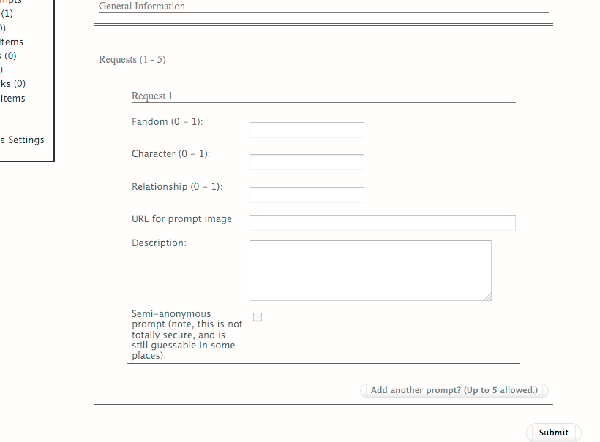
The exact details of this screen will vary depending on how the challenge has been set up, but you will usually need to enter a fandom and a description of your prompt. In some challenges, you may be allowed or required to enter a URL - for example, a link to an image for an image prompt.
Note: In all the fields except the URL and description fields, you will only be able to choose 'canonical' tags that are already in the AO3 system (the set of available tags may have been limited further by the challenge owner). These will come up in the autocomplete when you start typing.
You can choose to make your prompt 'semi-anonymous'. This means that your prompt will be displayed as 'anonymous'; however, since it will still be linked in the database with your username, we can't guarantee 100% anonymity - in some circumstances, such as a coding bug, it might be accidentally revealed or guessable. (We've put a lot of work into minimising the risk, but we want to be sure that our users are completely informed about their levels of privacy.)
Once you have filled in your prompt, you can add more. When you're done, press submit!
Managing your prompts
Once you have signed up and created some prompts, you can manage your prompts by going to the collection's home page, e.g. http://archiveofourown.org/collections/collectionname and accessing 'Your Prompts' (usually displayed in the left-hand menu). Here you can edit your existing prompts, add another prompt, or delete your signup.
Please note: Selecting 'delete' on this page, will delete your entire signup, including all prompts. If you want to delete just one prompt, go to the list of all Prompts (select 'Prompts' in the left-hand menu), where your prompts will display with a 'Remove' button next to them.
Browsing and claiming prompts
You can browse all the prompts in a challenge by going to the collection's home page, e.g. http://archiveofourown.org/collections/collectionname and accessing 'Prompts' (usually displayed in the left-hand menu). When you see one you like, just select 'Claim'.
You can keep track of all the prompts you've claimed in a particular challenge by going to the collection's home page, e.g. http://archiveofourown.org/collections/collectionname and accessing 'My Claims' (usually displayed in the left-hand menu). Beside each prompt you'll see a button marked 'Post to fulfil' - if you click on this you'll be taken to the 'Post new' form with the details of the prompt filled in.
Filling prompts
Once you've claimed a prompt, you can 'Post to fulfil' the prompt from the main Prompts page. You'll be taken to the 'Post new' form with the details of the prompt filled in. Make sure it has just the right box ticked - we have one bug where it ticks extra random prompts as well, which will be fixed in the next deploy.
If you go directly to the 'Post new' form without clicking 'Post to fulfil', you'll see your claimed prompts under the 'Associations' section. Just tick the one you are filling in order to post the fill to the challenge.
Anonymous prompt fills
If the challenge maintainer has set the challenge to 'anonymous', then when you post your fill to the collection, it will be displayed as by 'Anonymous'. However, please note that at this stage you should consider anon prompt fills to be 'semi-anonymous', and your identity may be revealed under the following circumstances:
- The challenge maintainer can see your identity
- An author search will reveal anonymous works which may enable people to guess what you wrote
- A tag for the fandom you wrote the anon work in will appear on the list of fandoms on your user homepage, which may enable people to guess what you wrote.
We're working on introducing enhanced anonymous features, but in the meantime you should be aware of the above issues: if it would be problematic for your authorship of a work to be revealed, you shouldn't rely on the Archive's anon option.
Happy prompting!
Pslasher Tue 12 Jul 2011 11:23AM UTC
Comment Actions
Zebra Tue 12 Jul 2011 12:09PM UTC
Comment Actions
Lanna Michaels (lannamichaels) Wed 13 Jul 2011 11:11PM UTC
Comment Actions
A (mumblemutter) Thu 14 Jul 2011 06:36PM UTC
Comment Actions
Lanna Michaels (lannamichaels) Thu 14 Jul 2011 09:22PM UTC
Comment Actions
Leapyearbaby29 Wed 29 Nov 2017 07:59PM UTC
Comment Actions
SilverMillennium_QueenNeptune Sat 01 Dec 2018 10:19PM UTC
Comment Actions
Account Deleted Sun 09 Dec 2018 03:17AM UTC
Comment Actions
Adel Mortescryche (AdelMortescryche) Sat 04 Apr 2020 01:18PM UTC
Comment Actions
clingfilm Sun 12 Apr 2020 06:47PM UTC
Comment Actions