
Post Header
Here's a quick guide to walk you through signing up for a gift exchange!
-
First you need to find the challenge. You may be linked from elsewhere, but if not, go to the Archive's main Collections page.

You can find a collection using the filter and sort options on the right:

The collection title and fandom fields offer autocomplete suggestions when you start typing.
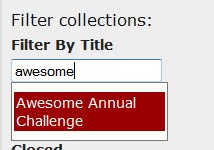
-
Once you've found the collection you're looking for, you will see its blurb:
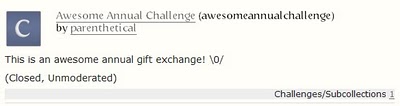
Clicking on the title will take you to that collection's page:
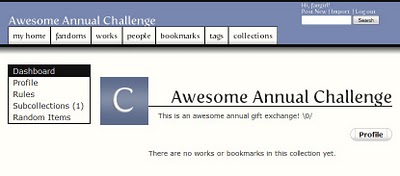
The links in the sidebar on the left allow you to view the collection's profile, read its rules, and view any subcollections it may have. If the collection is a challenge, the signup form will also be linked from the sidebar.
Sometimes, however, a challenge which is held on a regular basis will have a subcollection for each round. That's the case in our example: the Awesome Annual Challenge contains a subcollection called "Awesome Exchange 2010", the home for this year's challenge.

-
The challenge's sidebar will contain similar links to that of the parent collection. If you want to see when signups are due to open, check the Profile; it should list the important dates for the challenge (and if you've set your timezone on your Preferences page, it will even show you the exact times for your timezone as well). Once signups are open, there should be a link to the Signup Form in the sidebar, as well as in the navigation on the right.
Exactly what is contained on the signup form for a gift exchange will of course depend on the exact nature of the challenge! The owner of the challenge should have added more detailed instructions for your specific challenge to the signup form, but there are some basic things to look out for.
Normally, you will need to specify what your Requests - what you would like in the work created for you - and your Offers - what you are willing to write for the user you are assigned.
Any fields marked in red are required, while the others are optional. In the example below, for example, you are required to specify a certain number of fandoms. The numbers next to the label indicate how many you need to select - "Fandoms (1 - 5)" would mean that you must select between one and five fandoms. "Characters (0 - 2)", on the other hand, would mean that you are not required to list any characters, but you have the option of listing up to two.

In some cases, you may be required to choose from a predefined list. In the example above, the owner of the challenge has defined a certain number of eligible fandoms. Only a few are shown by default; clicking on the "X more fandoms to choose from" link will show the entire list.
In other cases, rather than having to select from a predefined list, you will be asked to type into a field. In the example below, this is the case for the characters you can request. To request more than one, separate them with a comma. Please note that in cases like this, the autocomplete will suggest specific forms of fandoms and character names, etc - you need to use these 'canonical' forms of the tags on signup forms so we can be sure everyone is using the same version and match people up correctly.(Note that the 'canonical' tags are those that appear in the sidebar filters when browsing the archive, and in the auto-complete.) If you try to put in something else not in the autocomplete, you will receive an error. If characters or relationships you want to select are not appearing, you will have to contact the exchange's moderator.

You could be asked to choose from a predefined list or to type in directly any of the following kinds of information. Very few forms will include all of the options below, however!
- Fandoms
- Characters
- Relationships
- Ratings
- Categories
- Freeforms
- Archive Warnings
Other fields which could appear in the requests and/or offers sections, depending on the challenge, include:
-
Prompt URL: If you are allowed or required to provide a link of some sort, this is where you'd enter it. Exactly what kind of link is expected will depend on the challenge, but it could be a link to a letter you've written to the person who'll be writing for you, or a link to your stories in a remix-type challenge, for example.
-
Description/Details: If you are asked to provide a more detailed prompt or other information, you would enter that here.
-
Optional Tags: This would be a space for you to add additional tags - for example, for things which aren't included in a predefined list for you to select from, or which fall into a category which doesn't appear elsewhere on the form. These optional tags will be used to try to ensure the best possible match with another user in the exchange, but they may be ignored if it isn't possible to match you using them. If you enter more than one additional tag, you should separate them using a comma.

-
Once you've finished filling in the details of your offer and request, click the Submit button at the bottom of the page to sign up!
You can view and edit your signup at any time after you've submitted it. On the sidebar of your "My Home" page, there is a "My Signups" section where you can view your signups for all challenges you're participating in.

-
Success! Once the owner of the challenge has matched you up with a user to write for in the gift exchange, you will be notified by email.
We hope that this will help you when signing up to participate in a gift exchange, but if you run into problems, please contact the Support team and we'll do our best to help!