
Work Text:
Step 1:
Select the overall arc and tone of your story. Don't be too specific at this point - the more specific you are, the harder it will be to find a match with what is in your head. I am going with "minesweeper goes out to sweep some mines, gets blown up". Is it going to be realistic or cartoon-ish? Since the premise is a bit grim, I know I'll want it to be a bit lighter and not go too realistic - sort of Wile E. Coyote style.
Step 2:
Map out the steps of the arc to ideas of sounds to tell it.
| Minesweeper goes out | Footsteps, bird song |
| Sweeps mines | Metal detector, planting a flag, digging |
| Moment before the explosion | "Uh-oh", click |
| Explosion | Loud, close, moderately long explosion |
Step 3:
Find and download some sound effects! I go to freesound.org because free sounds, and because the files are named in such a way as you can re-find them later.
Remember to check the copyright information. Creative Commons 0 is anything goes, but there are other types of licensing and if Attribution is requested, ensure you remember to do that! (As most if not all podfic is noncommercial, that isn't a concern here, but may be a concern in other scenarios.)
It can be very hit and miss. Sometimes there are so many sounds and this is where you go back to the tone and the picture you've built of your story arc to get it to a manageable number. If there's part of the effect you like, but not all of it, still make note of it. For your sanity and storage space, I would suggest no more than three sound effects for anything unless it's a very long part of the story.
| Element | Effects |
|---|---|
| Footsteps (in nature) | https://freesound.org/people/harrietniamh/sounds/400124/ https://freesound.org/people/The_Underdog/sounds/628810/ https://freesound.org/people/Ali_6868/packs/21607/ |
| Bird song | https://freesound.org/people/seenms/sounds/518680/ https://freesound.org/people/klankbeeld/sounds/735065/ |
| Metal detector | https://freesound.org/people/Amazing_Brick_Movies/sounds/414366/ https://freesound.org/people/sebastianlund/sounds/73554/ https://freesound.org/people/happyband/sounds/69175/ |
| Planting a flag | There wasn't a sound for this and I couldn't think of a similar thing to describe it. C'est la vie! |
| Digging (by hand) | https://freesound.org/people/YemiMoses/sounds/346044/ |
| Uh-oh | https://freesound.org/people/SamsterBirdies/sounds/398979/ |
| Click | End of one of the metal detector sounds? (half of) a dog clicker noise from my recording? |
| Explosion | https://freesound.org/people/juskiddink/sounds/108641/ https://freesound.org/people/ryansnook/sounds/110113/ https://freesound.org/people/CGEffex/sounds/93844/ |
Don't worry if you're missing some things - because we had a fairly loose story arc and a few ideas for most sections, we can still fill in the story! And we can go looking for more later if needs be.
Step 4:
Open all of the files in Audacity and do initial prep work. Mostly this is 2 things:
- Trimming out what you don't want - long silences, starts/finishes with starting/finishing recording noises, bits of talking - or, conversely cutting to just the parts you do want
- Converting tracks to mono. You can, I assume, do everything else in this guide in stereo, but I don't want to figure out how that works… so I don't.
- Depending on the nature of the clip you're using, do a few preliminary audio clean-up things - I did noise reduction and a high-pass filter (or filter curve of roll-off for speech) on some clips. Skip your declicker except for specific spots - it's more likely to get false positives than help with sound effects.
Depending how this goes, you may decide there's a track or two that can't be brought to your desired standard, or realise you don't actually like some of them so much in relation to others. I dropped one or two of everything I had duplicates/triplicates of at this point.
Either keep your modified files open (riskier) or save your modified files (smarter), but don't change the file or track names!
Step 5:
Open your primary project file in Audacity! Turn OFF synclock, and import or copy and paste each sound into a separate track. It's time to start putting things together!
Step 6:
Reduce the vertical size of your tracks so you can see how things fit together, and zoom out so you see more of the time. Now, drag things around until they fall roughly into the storyline you laid out in step 2.
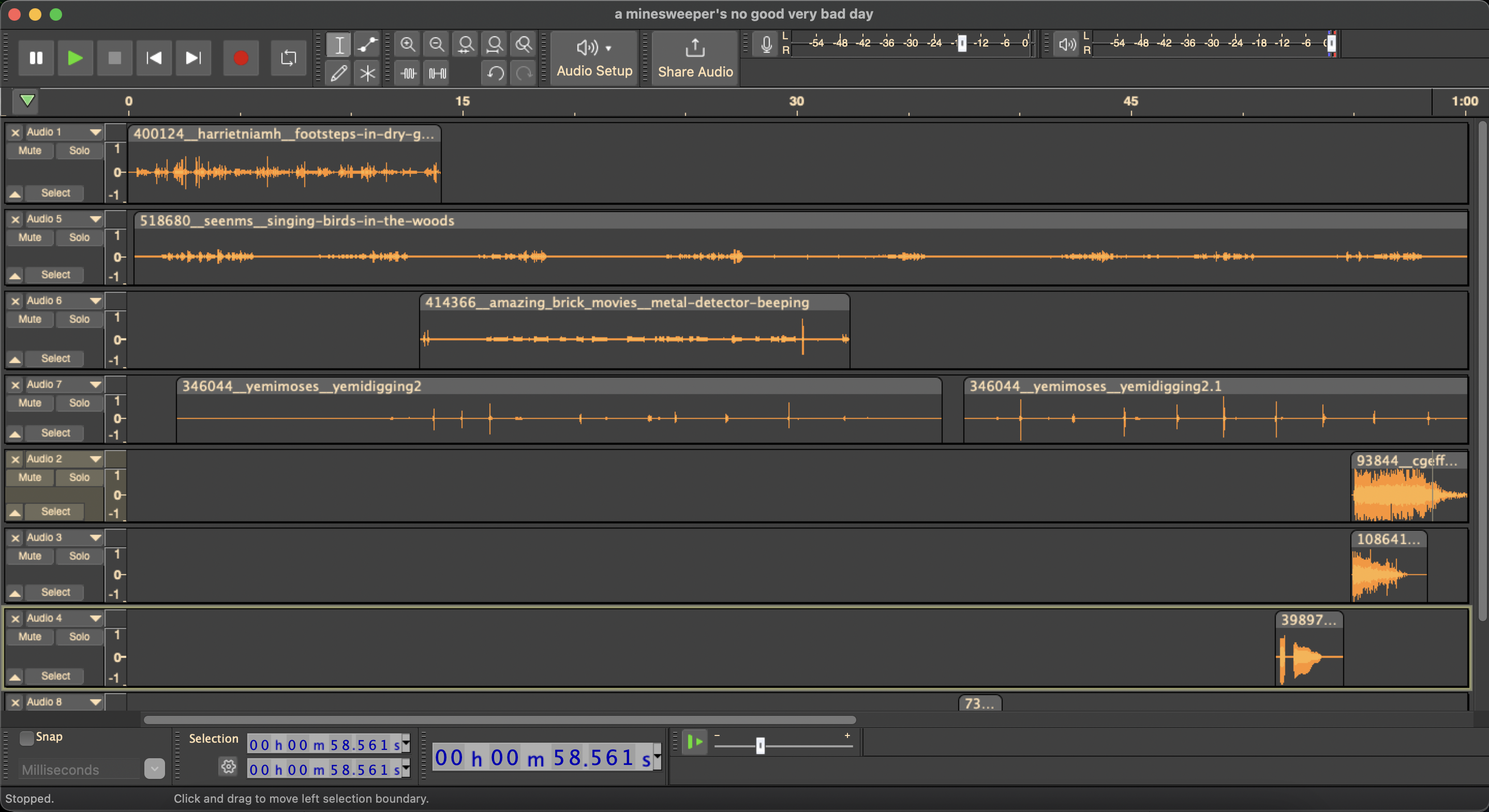
You can tell there are a few areas that have duplication, and a few areas that have way too much going on. This is when I take a research break to figure out how minesweeping actually works to figure out if everything I chose is appropriate. But minesweeper the game has little connection to real demining activities (did you know: minesweeping is over water, and these days often done by helicopter? demining is done on land, and once detected the general solution is blow it up just making sure no one is in the blast radius.), so I will exercise creative freedoms.
The story is getting a little clearer and more detailed now - the minesweeper goes out on a nice day to check the field. He runs around the metal detector which seems to say everything is good! So it's time for digging to plant things! But oops, his shovel hits a mine he missed, and… ka-boom. (He is a minesweeper and suitably attired for the experience, he doesn't have to die. Maybe I'll add some ambulance sirens and/or a groan to imply he lives.)
Step 7:
Go find the additional sound effects you decided you needed, then repeat steps 4-6 with these new sounds!
| Element | Effects |
|---|---|
| Footsteps (in nature) | https://freesound.org/people/harrietniamh/sounds/400124/ |
| Bird song | https://freesound.org/people/seenms/sounds/518680/ |
| Metal detector | https://freesound.org/people/Amazing_Brick_Movies/sounds/414366/ |
| Positive intonation | https://freesound.org/people/trimono/sounds/519112/ https://freesound.org/people/GotSka81/sounds/275808/ |
| Digging (by hand) | https://freesound.org/people/YemiMoses/sounds/346044/ |
| Click | Some of the shoveling sounds match what i want here |
| Uh-oh | https://freesound.org/people/SamsterBirdies/sounds/398979/ |
| Explosion | https://freesound.org/people/juskiddink/sounds/108641/ https://freesound.org/people/CGEffex/sounds/93844/ |
| Groan | https://freesound.org/people/vmgraw/sounds/257706/ https://freesound.org/people/muses212/sounds/103072/ https://freesound.org/people/deleted_user_2104797/sounds/171758/ |
| Ambulance siren | https://freesound.org/people/AudioPapkin/sounds/716552/ https://freesound.org/people/leo153/sounds/656086/ https://freesound.org/people/JPBILLINGSLEYJR/sounds/504522/ |
Step 8:
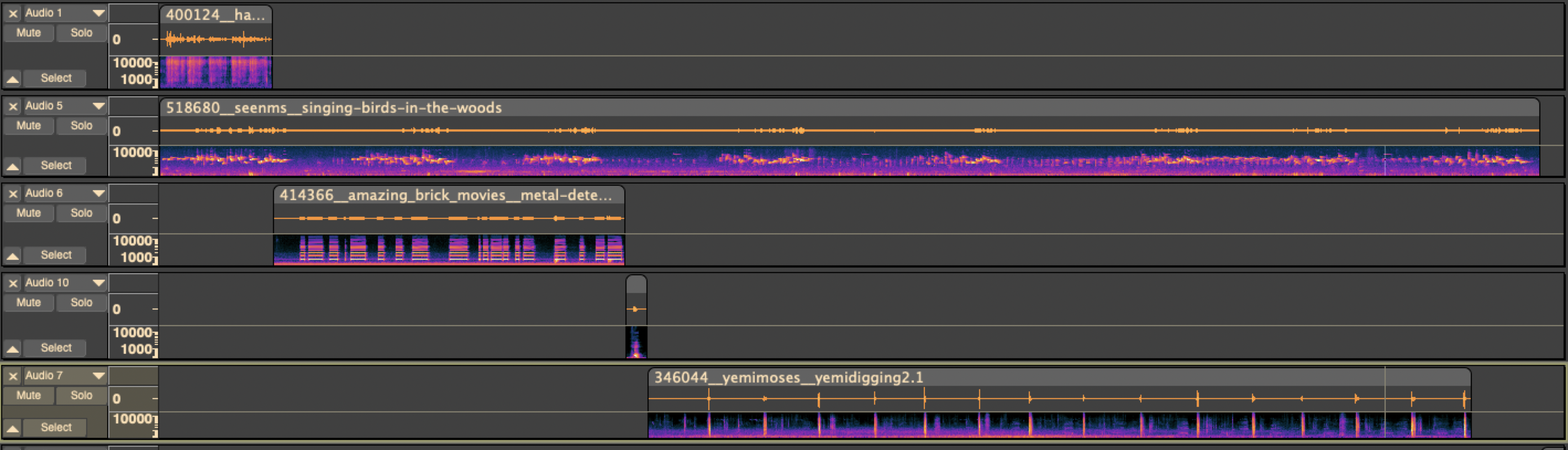
Trim the clips to the length and sound pieces that help to tell the story. This is the timing pass! Don't worry about volume, just get the lengths and content right. Things can (maybe even should) overlap.
Like here, the bird song starts and continues right through to the explosion, and the groaning overlaps with the ambulance coming.

Step 9:
Okay, now it's time to worry about the volume.
If you have a few clips that start or end abruptly and that isn't a feature, use Effect > Fading > Fade In or Effect > Fading > Fade Out to tidy up the ends of those clips.
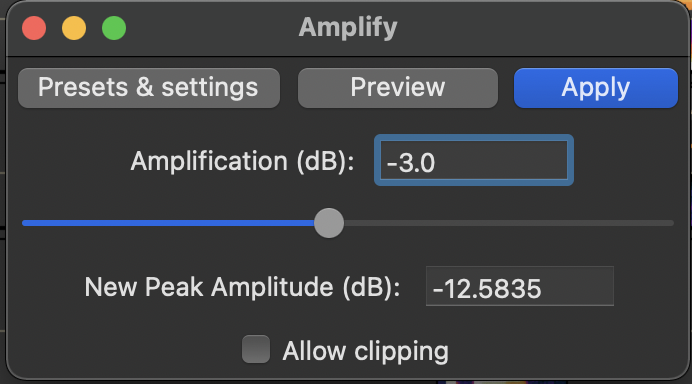
For individual clips, I use Effect > Volume and Compression > Amplify! The groans and the "uh-oh" were both louder than I wanted, so I de-amplified them by -3.0 - the top number needs to be negative to deamplify/make quieter, and positive to amplify/make louder.
Step 10:
Now we're into the stuff that you would probably do about the same for any podfic! Export to MP3 and include all the metadata that you need - artist, title, date, etc. If you want cover art, this is the time to get it done and add it to the file metadata. (Thank you to FanFixation for mine!)
Step 11:
Upload it to the hosting platform of your choice! This guide by GodOfLaundryBaskets is excellent if you don't already have your preferences determined.
Step 11:
Put all the necessary data into your HTML code generating spreadsheet! Or code it by hand. I use a modified version of mistbornhero's podfic spreadsheet.
Step 12:
Make your credits! If you kept the URLs of the files you actually used, congrats, this will be fairly easy. If you didn't, and you used freesound, you can reverse engineer the URL from the filename to figure out who to credit.
I use my "SFX" tab in my magical HTML generating spreadsheet to do the work of creating the code I'll use in my post. There'll be a little editing to do to take out the bit where I say sound effects at the beginning of each line, but that's easier than writing all the links by hand.
Here's what it looks like:
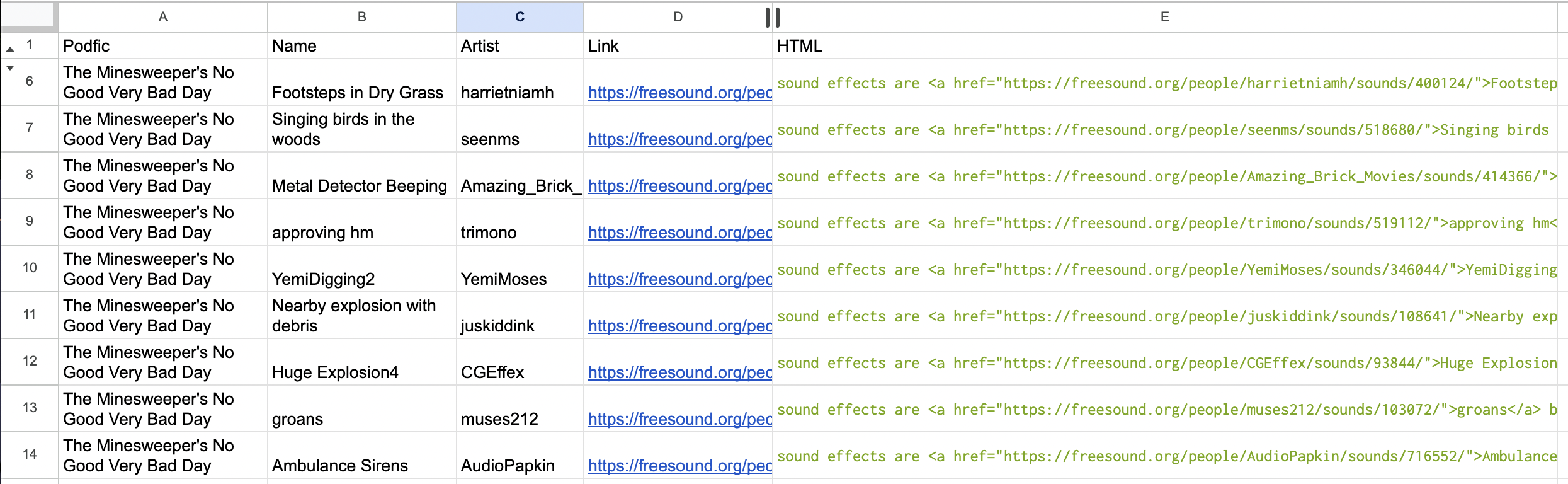
And here's the magical code to use (from the first non-header line in the sheet):
=CLEAN(CONCATENATE("sound effects are <a href=",char(34),D2,char(34),">",B2,"</a> by ",C2, "<br/>"))
Step 13:
Post! Fill in the required/desired header information, and then use the HTML generated by your spreadsheet. Add the credits into the appropriate section of the HTML.
Step 14:
And here we go, one story of A Minesweeper's No Good Very Bad Day
Step 15 (optional and time-limited):
Submit to Airtable for your Voiceteam points!