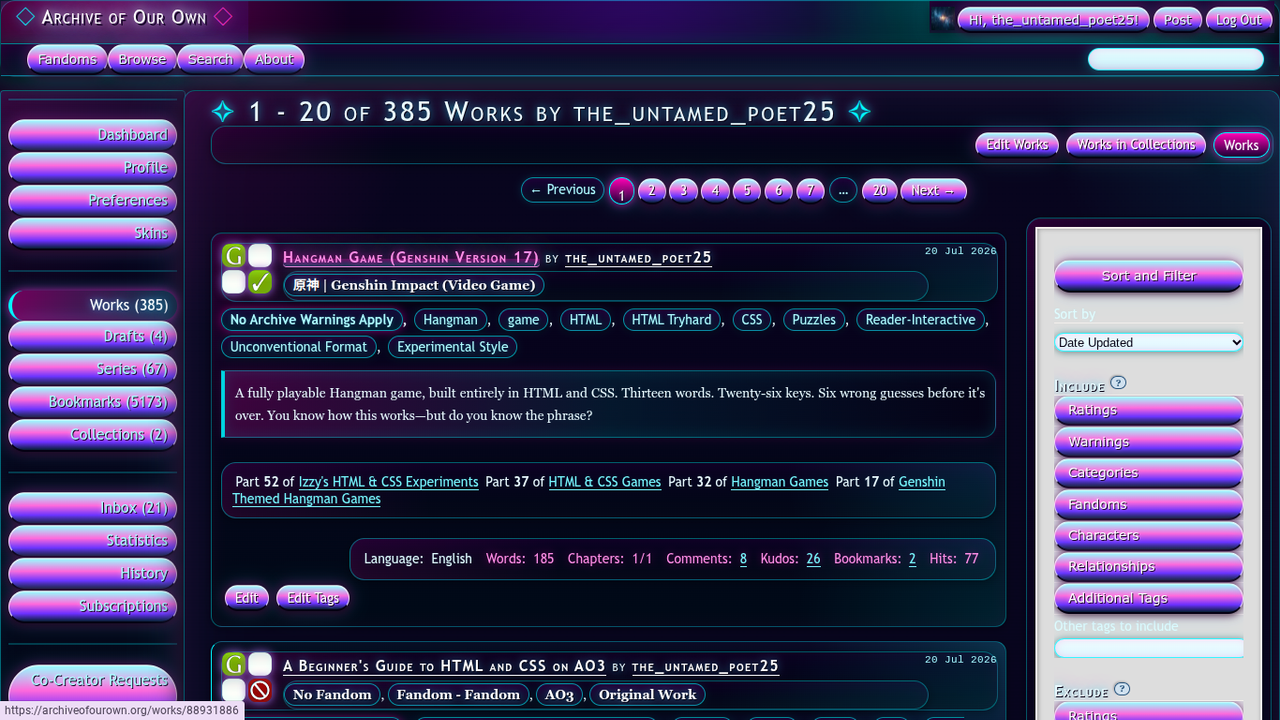
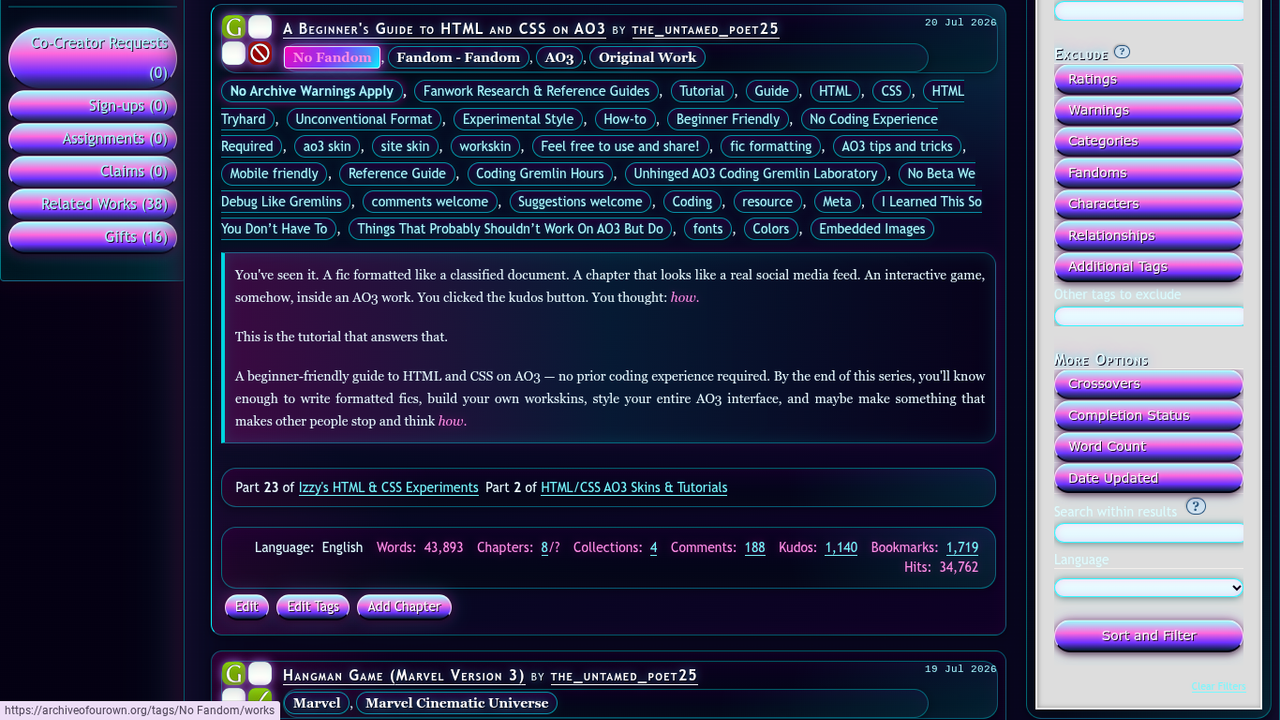
A free AO3 site skin drenched in hot pink, electric cyan, and ultraviolet — for anyone who wants their AO3 to look like it's lit entirely by a broken vending machine sign at 2am. This skin dresses your entire AO3 interface in void black with layered neon glow. The header pulses, and the tags light up like a sign catching power.
The skin reskins your header, navigation, sidebar dashboard, work listings, tags, pagination, comments, forms, and footer. A workskin is also included to style the body text of works you write, so your fic experience can match the aesthetic.
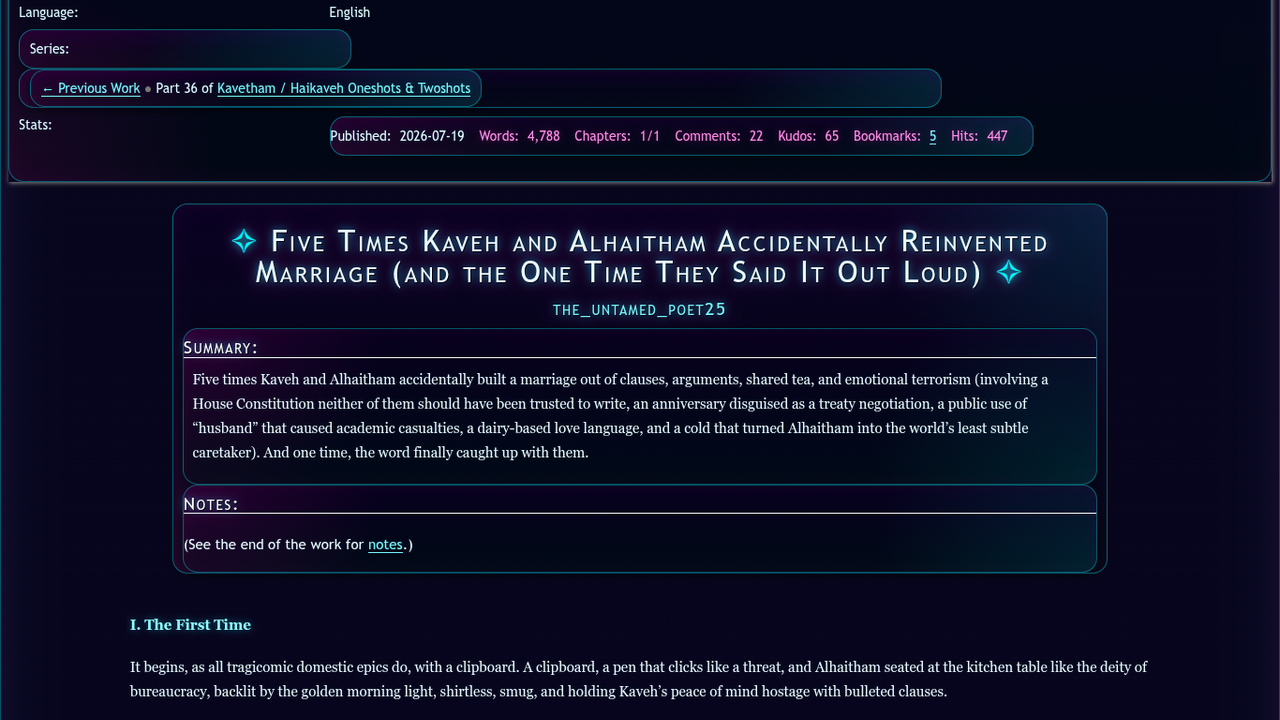
The workskin — the styled text area you see when reading a fic — looks like this:
The brighter neon background, drop cap, glowing headings, and neon scene dividers all appear automatically from the CSS — no special markup required in your fic text. Hover states on blurbs, tags, and glitch-text spans add a chromatic-split pulse throughout.
Site Skin CSS — click to expand/view
Copy everything in the box below. Please scroll.
html,
body {
  background: radial-gradient(circle at 8% 12%, rgba(255, 0, 180, 0.35), transparent 15em),
    radial-gradient(circle at 92% 10%, rgba(0, 245, 255, 0.32), transparent 18em),
    radial-gradient(circle at 50% 0%, rgba(128, 0, 255, 0.28), transparent 25em),
    radial-gradient(circle at 12% 82%, rgba(0, 255, 170, 0.18), transparent 20em),
    radial-gradient(circle at 88% 88%, rgba(255, 230, 0, 0.14), transparent 18em),
    linear-gradient(180deg, #050013 0%, #09001f 28%, #030712 62%, #020006 100%) !important;
  color: #e9faff !important;
  font-family: "Trebuchet MS", Verdana, Arial, sans-serif;
}

body {
  text-shadow: 0 0 4px rgba(0, 245, 255, 0.08);
}

#outer {
  background: radial-gradient(circle at 18% 16%, rgba(255, 0, 180, 0.16), transparent 18em),
    radial-gradient(circle at 80% 26%, rgba(0, 245, 255, 0.15), transparent 20em),
    radial-gradient(circle at 50% 100%, rgba(128, 0, 255, 0.18), transparent 26em),
    linear-gradient(180deg, rgba(4, 0, 19, 0.92), rgba(1, 3, 14, 0.98)) !important;
}

#inner {
  background: radial-gradient(circle at top left, rgba(255, 0, 180, 0.11), transparent 22em),
    radial-gradient(circle at bottom right, rgba(0, 245, 255, 0.10), transparent 22em),
    linear-gradient(180deg, rgba(5, 0, 20, 0.36), rgba(2, 4, 14, 0.88)) !important;
}

#main {
  position: relative;
  background: radial-gradient(circle at 0% 0%, rgba(255, 0, 180, 0.13), transparent 18em),
    radial-gradient(circle at 100% 0%, rgba(0, 245, 255, 0.12), transparent 18em),
    radial-gradient(circle at 50% 100%, rgba(128, 0, 255, 0.14), transparent 22em),
    linear-gradient(180deg, rgba(8, 5, 30, 0.97), rgba(1, 8, 18, 0.98)) !important;
  color: #e9faff !important;
  border: 1px solid rgba(0, 245, 255, 0.48);
  border-radius: 24px;
  box-shadow: 0 0 28px rgba(0, 0, 0, 0.88),
    0 0 30px rgba(255, 0, 180, 0.32),
    0 0 56px rgba(0, 245, 255, 0.18),
    inset 0 0 35px rgba(255, 0, 180, 0.09),
    inset 0 0 70px rgba(0, 245, 255, 0.06) !important;
  padding: 1.35em;
}

#main:before {
  content: none;
}

#main:after {
  content: "neon mode engaged.";
  display: block;
  text-align: center;
  color: rgba(255, 80, 220, 0.92);
  font-size: 0.82em;
  letter-spacing: 0.18em;
  text-transform: lowercase;
  padding: 1.4em 0 0 0;
  margin: 2em 0 0 0;
  border-top: 1px solid rgba(0, 245, 255, 0.34);
  text-shadow: 0 0 10px rgba(255, 0, 180, 0.85),
    0 0 22px rgba(0, 245, 255, 0.35);
}

#header {
  background: radial-gradient(circle at 10% 20%, rgba(255, 0, 180, 0.46), transparent 17em),
    radial-gradient(circle at 82% 18%, rgba(0, 245, 255, 0.45), transparent 18em),
    radial-gradient(circle at 50% 90%, rgba(128, 0, 255, 0.40), transparent 20em),
    linear-gradient(135deg, #030010 0%, #17002c 34%, #001c2a 66%, #030010 100%) !important;
  border-bottom: 4px solid #00f5ff;
  box-shadow: 0 6px 28px rgba(0, 0, 0, 0.80),
    0 0 32px rgba(0, 245, 255, 0.45),
    0 0 58px rgba(255, 0, 180, 0.24),
    inset 0 -45px 65px rgba(0, 0, 0, 0.58) !important;
}

#header .heading {
  background: linear-gradient(135deg, rgba(255, 0, 180, 0.18), rgba(0, 245, 255, 0.08), rgba(128, 0, 255, 0.12)) !important;
  padding: 0.5em 1.5em;
  height: auto;
}

#header h1,
#header h1.heading {
  padding-top: 0;
  margin: 0;
  font-size: 2.15em !important;
  line-height: 1.2;
}

#header .heading a,
#header h1 a,
#header h1.heading a {
  color: #effcff !important;
  font-family: "Trebuchet MS", Verdana, Arial, sans-serif;
  font-size: inherit !important;
  font-variant: small-caps;
  letter-spacing: 0.1em;
  text-decoration: none !important;
  padding-left: 0;
  text-shadow: 2px 2px 0 #140025,
    0 0 8px rgba(255, 255, 255, 0.85),
    0 0 18px rgba(0, 245, 255, 0.95),
    0 0 32px rgba(255, 0, 180, 0.82),
    0 0 52px rgba(128, 0, 255, 0.58) !important;
  transition: color 0.35s ease,
    text-shadow 0.35s ease,
    opacity 1.2s ease;
}

#header .heading a:before,
#header h1 a:before,
#header h1.heading a:before {
  content: "◇ ";
  color: #00f5ff;
  text-shadow: 0 0 10px rgba(0, 245, 255, 1),
    0 0 22px rgba(255, 0, 180, 0.65);
}

#header .heading a:after,
#header h1 a:after,
#header h1.heading a:after {
  content: " ◇";
  color: #ff33cc;
  text-shadow: 0 0 10px rgba(255, 0, 180, 1),
    0 0 22px rgba(0, 245, 255, 0.65);
}

body.javascript #header .heading a,
body.javascript #header h1 a,
body.javascript #header h1.heading a {
  color: #ffffff !important;
  text-shadow: 2px 2px 0 #140025,
    0 0 12px rgba(255, 255, 255, 0.95),
    0 0 24px rgba(0, 245, 255, 1),
    0 0 44px rgba(255, 0, 180, 0.95),
    0 0 70px rgba(128, 0, 255, 0.74) !important;
}

#header h1 sup,
#header .button,
#header .landmark,
#header .logo {
  display: none;
}

#header #greeting,
#header .primary,
#header .secondary,
#header .menu {
  background: linear-gradient(180deg, rgba(18, 0, 42, 0.98), rgba(0, 20, 35, 0.98)) !important;
  border-color: rgba(0, 245, 255, 0.50) !important;
  box-shadow: 0 3px 14px rgba(0, 0, 0, 0.62),
    inset 0 0 20px rgba(255, 0, 180, 0.10),
    0 0 18px rgba(0, 245, 255, 0.16) !important;
}

#header .primary {
  border-top: 1px solid rgba(255, 0, 180, 0.42);
  border-bottom: 1px solid rgba(0, 245, 255, 0.62);
}

#header .primary a,
#header .secondary a,
#header .menu a,
#header #greeting a {
  color: #dffcff !important;
  text-decoration: none !important;
  text-shadow: 0 0 6px rgba(0, 245, 255, 0.40),
    1px 1px 0 #030010;
}

#header .primary a:hover,
#header .secondary a:hover,
#header .menu a:hover,
#header #greeting a:hover {
  color: #ffffff !important;
  background: linear-gradient(135deg, #ff00b4 0%, #7a2cff 48%, #00f5ff 100%) !important;
  border-radius: 12px;
  text-shadow: 0 0 8px rgba(255, 255, 255, 0.95),
    0 0 16px rgba(0, 245, 255, 0.85),
    1px 1px 0 #100020 !important;
  box-shadow: 0 0 12px rgba(255, 0, 180, 0.72),
    0 0 22px rgba(0, 245, 255, 0.42) !important;
}

#header .dropdown:hover a,
#header .open a {
  background: rgba(255, 0, 180, 0.20) !important;
}

#header .menu {
  border: 1px solid rgba(0, 245, 255, 0.50);
  border-radius: 0 0 16px 16px;
}

#header .menu li {
  border-bottom: 1px solid rgba(255, 0, 180, 0.22);
}

#header .search input[type=text],
#header .search input[type=search],
#header .search input {
  background: linear-gradient(180deg, #eaffff, #d5f8ff) !important;
  color: #09001f !important;
  border: 1px solid rgba(0, 245, 255, 0.78) !important;
  border-radius: 999px !important;
  box-shadow: inset 0 0 10px rgba(255, 0, 180, 0.18),
    0 0 12px rgba(0, 245, 255, 0.38) !important;
}

#header .search input[type=submit],
#header .search button {
  background: linear-gradient(180deg, #ff74df 0%, #9d39ff 52%, #00d9ff 100%) !important;
  color: #ffffff !important;
  border: 1px solid rgba(255, 255, 255, 0.65) !important;
  border-radius: 999px !important;
  text-shadow: 1px 1px 0 #160024;
  box-shadow: 0 0 12px rgba(255, 0, 180, 0.55),
    0 0 20px rgba(0, 245, 255, 0.26) !important;
}

a,
a:link,
a:visited {
  color: #77f8ff !important;
  text-decoration: none;
  transition: color 0.35s ease,
    background 0.35s ease,
    box-shadow 0.35s ease,
    text-shadow 0.35s ease,
    border-color 0.35s ease;
}

a:hover,
a:focus {
  color: #ff75dc !important;
  text-decoration: none;
  text-shadow: 0 0 8px rgba(255, 0, 180, 0.88),
    0 0 18px rgba(0, 245, 255, 0.48),
    0 0 28px rgba(128, 0, 255, 0.30) !important;
}

#main a:hover {
  background: linear-gradient(to bottom, transparent 56%, rgba(255, 0, 180, 0.30) 56%, rgba(0, 245, 255, 0.20) 100%);
  border-radius: 4px;
}

h2,
h3,
h4,
.heading,
.name,
.title {
  color: #e9faff !important;
}

h2.heading,
h3.heading,
#main h2,
#main h3,
#main h4 {
  font-family: "Trebuchet MS", Verdana, Arial, sans-serif;
  font-variant: small-caps;
  letter-spacing: 0.08em;
  text-shadow: 1px 1px 0 #080013,
    0 0 10px rgba(0, 245, 255, 0.64),
    0 0 22px rgba(255, 0, 180, 0.44) !important;
}

#main h2:before,
#main h2:after {
  color: #00f5ff;
  text-shadow: 0 0 10px rgba(0, 245, 255, 0.96),
    0 0 20px rgba(255, 0, 180, 0.58);
}

#main h2:before {
  content: "✧ ";
}

#main h2:after {
  content: " ✧";
}

.work.blurb,
.bookmark.blurb,
.series.blurb,
.index .blurb {
  background: radial-gradient(circle at 0% 0%, rgba(255, 0, 180, 0.18), transparent 15em),
    radial-gradient(circle at 100% 100%, rgba(0, 245, 255, 0.13), transparent 17em),
    linear-gradient(135deg, rgba(12, 0, 34, 0.96), rgba(0, 18, 30, 0.98)) !important;
  border: 1px solid rgba(0, 245, 255, 0.44) !important;
  border-left: 7px solid #ff00b4 !important;
  border-radius: 18px;
  box-shadow: 0 3px 14px rgba(0, 0, 0, 0.64),
    0 0 18px rgba(255, 0, 180, 0.18),
    0 0 28px rgba(0, 245, 255, 0.10),
    inset 0 0 22px rgba(0, 245, 255, 0.06) !important;
  padding: 1.08em;
  margin: 1.12em 0;
  transition: box-shadow 0.35s ease,
    border-color 0.35s ease,
    background 0.35s ease;
}

.work.blurb:nth-of-type(even),
.bookmark.blurb:nth-of-type(even),
.series.blurb:nth-of-type(even) {
  background: radial-gradient(circle at 100% 0%, rgba(0, 245, 255, 0.18), transparent 15em),
    radial-gradient(circle at 0% 100%, rgba(255, 0, 180, 0.13), transparent 17em),
    linear-gradient(135deg, rgba(0, 16, 32, 0.98), rgba(14, 0, 36, 0.98)) !important;
  border-left-color: #00f5ff !important;
}

.blurb:hover,
.comment:hover {
  border-color: rgba(255, 0, 180, 0.78) !important;
  box-shadow: 0 0 18px rgba(255, 0, 180, 0.58),
    0 0 34px rgba(0, 245, 255, 0.32),
    0 0 48px rgba(128, 0, 255, 0.20),
    inset 0 0 24px rgba(255, 0, 180, 0.10) !important;
}

.blurb h4 a,
.blurb h5 a,
.blurb .heading a {
  color: #ffffff !important;
  font-weight: bold;
  text-shadow: 1px 1px 0 #030010,
    0 0 8px rgba(0, 245, 255, 0.45),
    0 0 14px rgba(255, 0, 180, 0.30) !important;
}

.blurb h4 a:hover,
.blurb h5 a:hover,
.blurb .heading a:hover {
  color: #ff8ee6 !important;
  text-shadow: 0 0 10px rgba(255, 0, 180, 0.96),
    0 0 22px rgba(0, 245, 255, 0.55),
    0 0 34px rgba(255, 255, 255, 0.28) !important;
}

.blurb .datetime {
  color: #a5f7ff !important;
}

.blurb blockquote {
  background: linear-gradient(to right, rgba(255, 0, 180, 0.22), rgba(0, 245, 255, 0.08), rgba(5, 0, 20, 0.62)) !important;
  border-left: 4px solid rgba(0, 245, 255, 0.86) !important;
  color: #dffcff !important;
  border-radius: 0 14px 14px 0;
  box-shadow: inset 0 0 16px rgba(0, 245, 255, 0.12),
    0 0 12px rgba(255, 0, 180, 0.12) !important;
}

.tags a,
a.tag,
.tag {
  background: linear-gradient(180deg, rgba(22, 0, 50, 0.98), rgba(0, 21, 38, 0.98)) !important;
  color: #adfbff !important;
  border: 1px solid rgba(0, 245, 255, 0.58) !important;
  border-radius: 999px;
  padding: 0.16em 0.58em;
  line-height: 1.85;
  box-shadow: 0 1px 5px rgba(0, 0, 0, 0.52),
    inset 0 0 10px rgba(255, 0, 180, 0.08),
    0 0 8px rgba(0, 245, 255, 0.10) !important;
  text-shadow: 0 0 5px rgba(0, 245, 255, 0.30);
  transition: background 0.35s ease,
    color 0.35s ease,
    box-shadow 0.35s ease,
    border-color 0.35s ease,
    text-shadow 0.35s ease;
}

.tags a:hover,
a.tag:hover,
.tag:hover {
  background: linear-gradient(135deg, #ff00b4 0%, #7b2cff 48%, #00f5ff 100%) !important;
  color: #ffffff !important;
  border-color: rgba(255, 255, 255, 0.82) !important;
  text-shadow: 0 0 7px rgba(255, 255, 255, 0.95),
    1px 1px 0 #160024 !important;
  box-shadow: 0 0 10px rgba(255, 0, 180, 0.86),
    0 0 20px rgba(0, 245, 255, 0.44),
    0 0 30px rgba(128, 0, 255, 0.36) !important;
}

.warnings .tag,
.required-tags .warnings,
.required-tags .rating,
.required-tags .category,
.required-tags .complete-no,
.required-tags .complete-yes {
  box-shadow: 0 0 10px rgba(255, 0, 180, 0.48),
    inset 0 0 10px rgba(0, 245, 255, 0.10) !important;
}

.actions a,
.actions a:link,
.action,
.action:link,
.actions input,
input[type=submit],
button,
.actions label {
  background: #7b2cff !important;
  background-image: linear-gradient(180deg, #9fffff 0%, #ff68dc 42%, #6d2cff 74%, #071126 100%) !important;
  color: #ffffff !important;
  border: 1px solid rgba(255, 255, 255, 0.72) !important;
  border-bottom: 2px solid #040012 !important;
  border-radius: 999px !important;
  box-shadow: 0 2px 8px rgba(0, 0, 0, 0.62),
    0 0 12px rgba(255, 0, 180, 0.38),
    0 0 22px rgba(0, 245, 255, 0.18),
    inset 0 1px 0 rgba(255, 255, 255, 0.42),
    inset 0 0 14px rgba(0, 245, 255, 0.12) !important;
  text-shadow: 1px 1px 0 #150022,
    0 0 5px rgba(255, 255, 255, 0.34) !important;
}

.actions a:hover,
.action:hover,
.actions input:hover,
input[type=submit]:hover,
button:hover,
.actions label:hover {
  background-image: linear-gradient(180deg, #ffffff 0%, #00f5ff 28%, #ff00b4 68%, #7b2cff 100%) !important;
  color: #050013 !important;
  border-color: rgba(255, 255, 255, 0.94) !important;
  text-shadow: 0 0 5px rgba(255, 255, 255, 0.90) !important;
  box-shadow: 0 0 14px rgba(0, 245, 255, 0.92),
    0 0 28px rgba(255, 0, 180, 0.62),
    0 0 42px rgba(128, 0, 255, 0.36),
    inset 0 1px 0 rgba(255, 255, 255, 0.76) !important;
}

.current,
.actions .current,
.pagination .current {
  background: linear-gradient(180deg, #ff00b4, #180034) !important;
  color: #ffffff !important;
  border-color: #00f5ff !important;
  border-radius: 999px;
  box-shadow: 0 0 10px rgba(255, 0, 180, 0.72),
    0 0 18px rgba(0, 245, 255, 0.32) !important;
}

input,
textarea,
select,
#work_title,
#work_summary,
#work_notes,
#work_endnotes,
#chapter_title,
#chapter_summary,
#chapter_notes,
#chapter_endnotes,
#content textarea,
form textarea,
form input[type=text],
form input[type=email],
form input[type=password],
form input[type=url],
form input[type=search] {
  background: linear-gradient(180deg, #effcff, #dff8ff) !important;
  color: #050013 !important;
  border: 1px solid rgba(0, 245, 255, 0.78) !important;
  border-radius: 12px !important;
  box-shadow: inset 0 0 8px rgba(255, 0, 180, 0.16),
    0 1px 8px rgba(0, 0, 0, 0.40),
    0 0 10px rgba(0, 245, 255, 0.20) !important;
  text-shadow: none !important;
}

textarea::placeholder,
input::placeholder {
  color: #5b3b80 !important;
  opacity: 1 !important;
}

input:focus,
textarea:focus,
select:focus,
form textarea:focus,
form input[type=text]:focus,
form input[type=email]:focus,
form input[type=password]:focus,
form input[type=url]:focus,
form input[type=search]:focus {
  background: linear-gradient(180deg, #ffffff, #e7fdff) !important;
  color: #020006 !important;
  border-color: #ff00b4 !important;
  box-shadow: 0 0 12px rgba(255, 0, 180, 0.68),
    0 0 22px rgba(0, 245, 255, 0.30),
    inset 0 0 10px rgba(0, 245, 255, 0.16) !important;
}

form label,
form dt,
form dd,
form p,
form .notice,
form .caution,
form .footnote,
form .instructions,
form .required,
form .landmark {
  color: #dffcff !important;
}

form .notice,
.notice {
  background: linear-gradient(135deg, #eaffff, #ffd8f5) !important;
  color: #140025 !important;
  border: 1px solid rgba(255, 0, 180, 0.52) !important;
  border-radius: 14px;
  box-shadow: 0 0 12px rgba(0, 245, 255, 0.22),
    inset 0 0 14px rgba(255, 0, 180, 0.10) !important;
}

form .caution,
.caution,
.error {
  background: linear-gradient(135deg, #260018, #360033) !important;
  color: #ffdff8 !important;
  border: 1px solid rgba(255, 0, 180, 0.72) !important;
  border-radius: 14px;
  box-shadow: 0 0 14px rgba(255, 0, 180, 0.36),
    inset 0 0 12px rgba(0, 245, 255, 0.06) !important;
}

#dashboard,
#sidebar {
  background: radial-gradient(circle at 0% 0%, rgba(255, 0, 180, 0.16), transparent 14em),
    radial-gradient(circle at 100% 100%, rgba(0, 245, 255, 0.10), transparent 16em),
    linear-gradient(180deg, rgba(9, 0, 28, 0.96), rgba(0, 10, 22, 0.98)) !important;
  border: 1px solid rgba(0, 245, 255, 0.42) !important;
  border-radius: 18px;
  box-shadow: 0 3px 14px rgba(0, 0, 0, 0.55),
    0 0 20px rgba(255, 0, 180, 0.12),
    inset 0 0 22px rgba(0, 245, 255, 0.06) !important;
}

#dashboard ul,
#dashboard li,
#sidebar ul,
#sidebar li {
  border-color: rgba(0, 245, 255, 0.22) !important;
}

#dashboard a,
#sidebar a {
  color: #aafaff !important;
  text-shadow: 0 0 6px rgba(0, 245, 255, 0.28);
}

#dashboard a:hover,
#sidebar a:hover {
  color: #ff8ee6 !important;
  background: linear-gradient(to right, rgba(255, 0, 180, 0.30), rgba(0, 245, 255, 0.12)) !important;
  border-radius: 10px;
}

#dashboard .current {
  background: linear-gradient(to right, rgba(255, 0, 180, 0.42), rgba(0, 245, 255, 0.18)) !important;
  border-left: 4px solid #00f5ff;
  color: #ffffff !important;
  text-shadow: 0 0 8px rgba(0, 245, 255, 0.70),
    0 0 14px rgba(255, 0, 180, 0.40);
}

.comment,
.comment div.icon,
.thread .comment {
  background: radial-gradient(circle at 0% 0%, rgba(255, 0, 180, 0.14), transparent 14em),
    radial-gradient(circle at 100% 100%, rgba(0, 245, 255, 0.10), transparent 16em),
    linear-gradient(180deg, rgba(12, 0, 34, 0.98), rgba(0, 10, 22, 0.98)) !important;
  border-color: rgba(0, 245, 255, 0.50) !important;
  color: #e9faff !important;
}

.comment {
  border-radius: 18px;
  box-shadow: 0 3px 14px rgba(0, 0, 0, 0.54),
    inset 0 0 16px rgba(255, 0, 180, 0.08),
    0 0 16px rgba(0, 245, 255, 0.08) !important;
}

.comment h4.byline {
  background: linear-gradient(to right, #17002c, #ff00b4, #00f5ff) !important;
  color: #ffffff !important;
  border-radius: 14px 14px 0 0;
  padding: 0.45em 0.75em;
  text-shadow: 1px 1px 0 #050013,
    0 0 8px rgba(255, 255, 255, 0.55);
}

.comment h4.byline a {
  color: #ffffff !important;
}

.comment .userstuff {
  background: rgba(3, 0, 18, 0.50) !important;
  border-radius: 0 0 14px 14px;
}

dl.stats,
.meta,
.preface,
.notes,
.summary,
.associations,
.series,
.bookmark .user {
  background: radial-gradient(circle at top right, rgba(0, 245, 255, 0.12), transparent 16em),
    radial-gradient(circle at bottom left, rgba(255, 0, 180, 0.10), transparent 16em),
    linear-gradient(180deg, rgba(10, 0, 34, 0.88), rgba(0, 8, 20, 0.92)) !important;
  border: 1px solid rgba(0, 245, 255, 0.38) !important;
  border-radius: 16px;
  padding: 0.78em;
  box-shadow: inset 0 0 18px rgba(255, 0, 180, 0.06),
    0 2px 10px rgba(0, 0, 0, 0.34) !important;
}

dl.stats dt,
dl.stats dd,
.meta dd,
.meta dt {
  color: #dffcff !important;
}

.stats .hits,
.stats .kudos,
.stats .comments,
.stats .bookmarks,
.stats .words,
.stats .chapters,
.stats .collections {
  color: #ff8ee6 !important;
  text-shadow: 0 0 8px rgba(255, 0, 180, 0.42);
}

table,
thead,
tbody,
tfoot,
tr,
td,
th {
  border-color: rgba(0, 245, 255, 0.42) !important;
}

th {
  background: linear-gradient(180deg, #2c0060, #001c2a) !important;
  color: #ffffff !important;
  text-shadow: 1px 1px 0 #020006,
    0 0 8px rgba(0, 245, 255, 0.48) !important;
}

td {
  background: rgba(3, 6, 22, 0.84) !important;
  color: #e9faff !important;
}

.pagination,
#main .pagination {
  background: transparent !important;
}

.pagination a,
.pagination span {
  background: linear-gradient(180deg, rgba(22, 0, 50, 0.98), rgba(0, 18, 32, 0.98)) !important;
  border: 1px solid rgba(0, 245, 255, 0.58) !important;
  border-radius: 999px;
  color: #adfbff !important;
  margin: 0.12em;
  padding: 0.28em 0.65em;
  box-shadow: 0 0 8px rgba(0, 245, 255, 0.14),
    inset 0 0 8px rgba(255, 0, 180, 0.08) !important;
}

.pagination a:hover {
  background: linear-gradient(135deg, #ff00b4, #7b2cff 48%, #00f5ff) !important;
  color: #ffffff !important;
  box-shadow: 0 0 12px rgba(255, 0, 180, 0.72),
    0 0 22px rgba(0, 245, 255, 0.36) !important;
}

#footer {
  background: radial-gradient(circle at 50% 0%, rgba(0, 245, 255, 0.24), transparent 20em),
    radial-gradient(circle at 8% 80%, rgba(255, 0, 180, 0.18), transparent 18em),
    radial-gradient(circle at 92% 80%, rgba(128, 0, 255, 0.18), transparent 18em),
    linear-gradient(180deg, #001c2a, #12002e 55%, #020006) !important;
  color: #e9faff !important;
  border-top: 4px solid #ff00b4;
  box-shadow: 0 -6px 24px rgba(0, 0, 0, 0.62),
    0 0 24px rgba(255, 0, 180, 0.28),
    0 0 34px rgba(0, 245, 255, 0.16) !important;
}

#footer a {
  color: #77f8ff !important;
}

#footer a:hover {
  color: #ff8ee6 !important;
  text-shadow: 0 0 8px rgba(255, 0, 180, 0.88),
    0 0 18px rgba(0, 245, 255, 0.28) !important;
}

hr {
  border: 0;
  height: 1px;
  background: linear-gradient(to right, transparent, rgba(255, 0, 180, 0.76), rgba(0, 245, 255, 1), rgba(255, 255, 255, 0.72), rgba(255, 0, 180, 0.76), transparent) !important;
  margin: 1.8em auto;
  box-shadow: 0 0 8px rgba(0, 245, 255, 0.74),
    0 0 16px rgba(255, 0, 180, 0.42);
}

hr:after {
  content: "✦";
  display: block;
  text-align: center;
  color: #ff33cc;
  margin-top: -0.78em;
  text-shadow: 0 0 10px rgba(255, 0, 180, 1),
    0 0 20px rgba(0, 245, 255, 0.60),
    0 0 30px rgba(255, 255, 255, 0.28);
}

#main .landmark,
.landmark {
  color: #9cecff !important;
}

.userstuff {
  color: #e9faff !important;
  font-family: Georgia, "Times New Roman", serif;
  line-height: 1.82;
}

.userstuff p {
  color: #e9faff !important;
}

.userstuff em,
.userstuff i {
  color: #ff8ee6 !important;
  text-shadow: 0 0 8px rgba(255, 0, 180, 0.38);
}

.userstuff strong,
.userstuff b {
  color: #8ffcff !important;
  text-shadow: 0 0 8px rgba(0, 245, 255, 0.44);
}

.userstuff blockquote {
  background: linear-gradient(to right, rgba(255, 0, 180, 0.18), rgba(0, 245, 255, 0.08), transparent) !important;
  border-left: 4px solid #ff00b4 !important;
  color: #e9faff !important;
  border-radius: 0 14px 14px 0;
  box-shadow: inset 0 0 18px rgba(255, 0, 180, 0.08),
    0 0 12px rgba(0, 245, 255, 0.10) !important;
}

.userstuff p:nth-of-type(7n) {
  background: linear-gradient(to right, transparent, rgba(0, 245, 255, 0.08), rgba(255, 0, 180, 0.05), transparent);
  border-radius: 12px;
}

.userstuff p:nth-of-type(11n) {
  text-shadow: 0 0 8px rgba(0, 245, 255, 0.10),
    0 0 14px rgba(255, 0, 180, 0.08);
}

details {
  background: linear-gradient(180deg, rgba(10, 0, 34, 0.88), rgba(0, 14, 26, 0.88)) !important;
  border: 1px solid rgba(0, 245, 255, 0.42);
  border-radius: 14px;
  padding: 0.6em 0.8em;
  margin: 0.8em 0;
  box-shadow: inset 0 0 14px rgba(255, 0, 180, 0.06),
    0 0 12px rgba(0, 245, 255, 0.08);
}

summary {
  color: #ff8ee6 !important;
  font-weight: bold;
  letter-spacing: 0.04em;
  text-shadow: 0 0 8px rgba(255, 0, 180, 0.55),
    0 0 14px rgba(0, 245, 255, 0.22);
}

details[open] {
  border-color: rgba(255, 0, 180, 0.62);
  box-shadow: 0 0 14px rgba(255, 0, 180, 0.28),
    inset 0 0 16px rgba(0, 245, 255, 0.08);
}

.module,
.region,
.dashboard .own,
.statistics,
.fandoms,
.filters,
.collection,
.home .module {
  background: radial-gradient(circle at top left, rgba(255, 0, 180, 0.12), transparent 14em),
    radial-gradient(circle at bottom right, rgba(0, 245, 255, 0.10), transparent 16em),
    linear-gradient(180deg, rgba(8, 0, 30, 0.92), rgba(0, 10, 22, 0.94)) !important;
  border: 1px solid rgba(0, 245, 255, 0.34) !important;
  border-radius: 16px;
  color: #e9faff !important;
  box-shadow: 0 2px 10px rgba(0, 0, 0, 0.36),
    inset 0 0 16px rgba(255, 0, 180, 0.05) !important;
}

.module h3,
.region h3,
.dashboard .own h3,
.statistics h3,
.fandoms h3,
.filters h3 {
  color: #ffffff !important;
  text-shadow: 0 0 8px rgba(0, 245, 255, 0.54),
    0 0 16px rgba(255, 0, 180, 0.34);
}

.required-tags,
.blurb .required-tags {
  filter: none;
}

.required-tags span,
.required-tags a {
  border-radius: 8px;
  box-shadow: 0 0 8px rgba(0, 245, 255, 0.28),
    0 0 12px rgba(255, 0, 180, 0.18) !important;
}

#main {
  padding: 0.9em;
  border-radius: 18px;
}

#header .heading {
  padding: 0.5em 1.2em;
  height: auto;
}

#header h1,
#header h1.heading {
  padding-top: 0;
  font-size: 1.8em !important;
}

#header .heading a,
#header h1 a,
#header h1.heading a {
  font-size: inherit !important;
  letter-spacing: 0.08em;
  padding-left: 0;
}

.work.blurb,
.bookmark.blurb,
.series.blurb,
.index .blurb,
.comment {
  border-radius: 14px;
  padding: 0.85em;
}

.tags a,
a.tag,
.tag {
  line-height: 2.1;
  padding: 0.22em 0.62em;
}

.actions a,
.action,
.actions input,
input[type=submit],
button,
.actions label {
  line-height: 1.6;
  padding: 0.35em 0.8em;
}

body,
html {
  background: radial-gradient(circle at 12% 8%, rgba(255, 0, 180, 0.30), transparent 12em),
      radial-gradient(circle at 88% 12%, rgba(0, 245, 255, 0.28), transparent 12em),
      linear-gradient(180deg, #050013 0%, #020006 100%) !important;
}

#header .heading {
  padding: 0.45em 0.8em;
  height: auto;
}

#header h1,
#header h1.heading {
  padding-top: 0;
  font-size: 1.45em !important;
}

#header .heading a,
#header h1 a,
#header h1.heading a {
  font-size: inherit !important;
  letter-spacing: 0.05em;
  padding-left: 0;
  text-shadow: 1px 1px 0 #140025,
      0 0 10px rgba(0, 245, 255, 0.82),
      0 0 18px rgba(255, 0, 180, 0.68) !important;
}

#main {
  padding: 0.55em;
  border-radius: 12px;
}

#main:before {
  font-size: 0.66em;
  letter-spacing: 0.14em;
}

#main:after {
  content: "neon mode.";
  font-size: 0.72em;
}

.userstuff {
  line-height: 1.72;
}

.work.blurb,
.bookmark.blurb,
.series.blurb,
.index .blurb,
.comment {
  padding: 0.72em;
  border-radius: 12px;
}

.pagination a,
.pagination span {
  padding: 0.32em 0.62em;
  line-height: 2;
}
Workskin CSS — click to expand/view
Copy everything in the box below. Please scroll.
/* ============================================
   NEON LOVER WORKSKIN
   companion piece to the Neon Lover site skin
   ============================================ */

#workskin {
  background: radial-gradient(circle at 8% 8%, rgba(255, 0, 180, 0.34), transparent 18em),
    radial-gradient(circle at 92% 12%, rgba(0, 245, 255, 0.30), transparent 20em),
    radial-gradient(circle at 50% 52%, rgba(180, 107, 255, 0.18), transparent 22em),
    radial-gradient(circle at 15% 92%, rgba(255, 142, 230, 0.20), transparent 18em),
    radial-gradient(circle at 88% 88%, rgba(126, 242, 255, 0.18), transparent 18em),
    linear-gradient(180deg, #17002f 0%, #080028 42%, #001b2d 100%) !important;
  color: #f3fdff !important;
  border: 1px solid rgba(0, 245, 255, 0.72);
  border-radius: 20px;
  padding: 1.45em 1.65em;
  font-family: "Trebuchet MS", Verdana, Arial, sans-serif;
  line-height: 1.75;
  box-shadow: 0 0 18px rgba(255, 0, 180, 0.32),
    0 0 34px rgba(0, 245, 255, 0.22),
    inset 0 0 28px rgba(255, 0, 180, 0.12),
    inset 0 0 44px rgba(0, 245, 255, 0.08) !important;
}

#workskin p {
  color: #f3fdff !important;
}

#workskin .userstuff p,
#workskin > p {
  text-shadow: 0 0 5px rgba(0, 245, 255, 0.16),
    0 0 10px rgba(255, 0, 180, 0.08);
}

#workskin .userstuff p:nth-of-type(4n),
#workskin > p:nth-of-type(4n) {
  background: linear-gradient(to right, rgba(255, 0, 180, 0.10), rgba(0, 245, 255, 0.06), transparent) !important;
  border-radius: 12px;
  padding: 0.15em 0.35em;
}

/* ---- drop cap: pink/cyan split glow ---- */
#workskin .userstuff > p:first-of-type::first-letter,
#workskin > p:first-of-type::first-letter {
  float: left;
  font-size: 3.3em;
  line-height: 0.85;
  font-weight: bold;
  padding: 0.05em 0.1em 0 0;
  font-family: Georgia, "Times New Roman", serif;
  color: #ffffff;
  text-shadow: -2px 0 0 rgba(255, 0, 180, 0.95),
    2px 0 0 rgba(0, 245, 255, 0.95),
    0 0 14px rgba(255, 255, 255, 0.80),
    0 0 24px rgba(255, 0, 180, 0.75),
    0 0 38px rgba(0, 245, 255, 0.58);
}

/* suppress the drop cap where it shouldn't fire */
#workskin blockquote > p:first-of-type::first-letter,
#workskin details > p:first-of-type::first-letter,
#workskin .side-note > p:first-of-type::first-letter {
  float: none;
  font-size: 1em;
  font-weight: normal;
  padding: 0;
  color: inherit;
  text-shadow: none;
}

/* ---- headings ---- */
#workskin h2,
#workskin h3 {
  text-align: center;
  font-variant: small-caps;
  letter-spacing: 0.09em;
  color: #ffffff !important;
  margin: 1.35em 0 0.85em 0;
}

#workskin h2 {
  font-size: 1.55em;
  background: linear-gradient(to right, transparent, rgba(255, 0, 180, 0.18), rgba(0, 245, 255, 0.16), transparent) !important;
  border-top: 1px solid rgba(0, 245, 255, 0.34);
  border-bottom: 1px solid rgba(255, 0, 180, 0.34);
  border-radius: 999px;
  padding: 0.28em 0.5em;
  text-shadow: 0 0 8px rgba(255, 255, 255, 0.95),
    0 0 18px rgba(0, 245, 255, 0.95),
    0 0 34px rgba(255, 0, 180, 0.72),
    0 0 48px rgba(180, 107, 255, 0.45);
}

#workskin h2::before,
#workskin h2::after {
  content: " ⌁ ";
  color: #00f5ff;
  text-shadow: 0 0 10px rgba(0, 245, 255, 1),
    0 0 18px rgba(255, 0, 180, 0.72);
}

#workskin h3 {
  font-size: 1.15em;
  color: #dffcff !important;
  text-shadow: 0 0 7px rgba(255, 0, 180, 0.70),
    0 0 15px rgba(0, 245, 255, 0.55);
}

#workskin h3::before,
#workskin h3::after {
  content: " ⌁ ";
  color: #ff33cc;
  text-shadow: 0 0 8px rgba(255, 0, 180, 0.92);
}

/* ---- blockquote ---- */
#workskin blockquote {
  position: relative;
  background: linear-gradient(to right, rgba(255, 0, 180, 0.24), rgba(0, 245, 255, 0.12), rgba(180, 107, 255, 0.07)) !important;
  border-left: 5px solid #00f5ff !important;
  border-right: 1px solid rgba(255, 0, 180, 0.38);
  border-radius: 0 16px 16px 0;
  color: #f3fdff !important;
  padding: 0.95em 1.15em 0.95em 1.7em;
  margin: 1.15em 0;
  box-shadow: inset 0 0 20px rgba(255, 0, 180, 0.12),
    0 0 15px rgba(0, 245, 255, 0.20) !important;
}

#workskin blockquote::before {
  content: "\201C";
  position: absolute;
  left: 0.1em;
  top: -0.15em;
  font-size: 2.5em;
  font-family: Georgia, serif;
  color: #ff33cc;
  text-shadow: 0 0 10px rgba(255, 0, 180, 0.95),
    0 0 18px rgba(0, 245, 255, 0.45);
}

/* ---- emphasis ---- */
#workskin em,
#workskin i {
  color: #7ef2ff !important;
  font-style: italic;
  text-shadow: 0 0 7px rgba(0, 245, 255, 0.58),
    0 0 14px rgba(0, 245, 255, 0.22);
}

#workskin strong,
#workskin b {
  color: #ff8ee6 !important;
  text-shadow: 0 0 7px rgba(255, 0, 180, 0.62),
    0 0 14px rgba(255, 0, 180, 0.26);
}

#workskin strong em,
#workskin em strong,
#workskin b i,
#workskin i b {
  color: #ffffff !important;
  text-shadow: 0 0 8px rgba(255, 255, 255, 0.95),
    0 0 18px rgba(0, 245, 255, 0.80),
    0 0 28px rgba(255, 0, 180, 0.70);
}

/* ---- scene break: plain <hr> ---- */
#workskin hr {
  border: 0;
  height: 2px;
  background: linear-gradient(to right, transparent, #ff00b4, #00f5ff, #ffffff, #00f5ff, #ff00b4, transparent) !important;
  margin: 2em auto;
  box-shadow: 0 0 10px rgba(0, 245, 255, 0.88),
    0 0 20px rgba(255, 0, 180, 0.62),
    0 0 34px rgba(180, 107, 255, 0.32);
}

#workskin hr::after {
  content: "⌁";
  display: block;
  text-align: center;
  margin-top: -0.72em;
  color: #ffffff;
  text-shadow: 0 0 8px rgba(255, 255, 255, 1),
    0 0 14px rgba(255, 0, 180, 0.95),
    0 0 24px rgba(0, 245, 255, 0.78);
}

/* ---- .divider: inline scene break ---- */
#workskin .divider {
  display: block;
  text-align: center;
  color: #ffffff;
  letter-spacing: 0.42em;
  margin: 1.7em 0;
  text-shadow: -1px 0 0 rgba(255, 0, 180, 0.95),
    1px 0 0 rgba(0, 245, 255, 0.95),
    0 0 10px rgba(0, 245, 255, 0.90),
    0 0 20px rgba(255, 0, 180, 0.62);
}

/* ---- .static: signal-noise divider ---- */
#workskin .static {
  display: block;
  text-align: center;
  margin: 1.8em 0;
  line-height: 2.4em;
}

#workskin .static p {
  margin: 0;
  display: inline !important;
}

#workskin .static br {
  display: none !important;
}

#workskin .static span {
  display: inline-block;
  margin: 0 0.12em;
  font-size: 1.15em;
  opacity: 0.32;
  transform: translateY(-2px);
  transition: opacity 1.6s linear, transform 1.6s linear, text-shadow 1.6s linear;
}

#workskin:is(body.javascript *) .static span {
  opacity: 1;
  transform: translateY(0);
}

#workskin .static .n-a {
  color: #ff00b4;
  text-shadow: 0 0 9px rgba(255, 0, 180, 0.95),
    0 0 18px rgba(255, 0, 180, 0.42);
}

#workskin .static .n-b {
  color: #00f5ff;
  text-shadow: 0 0 9px rgba(0, 245, 255, 0.95),
    0 0 18px rgba(0, 245, 255, 0.42);
}

#workskin .static .n-c {
  color: #ffffff;
  text-shadow: 0 0 10px rgba(255, 255, 255, 0.90),
    0 0 18px rgba(0, 245, 255, 0.42);
}

#workskin .static .n-d {
  color: #b46bff;
  text-shadow: 0 0 9px rgba(180, 107, 255, 0.90),
    0 0 18px rgba(255, 0, 180, 0.32);
}

/* ---- .glitch: AO3-safe chromatic split text ---- */
/* Use like: <span class="glitch">your text here</span> */
/* No title="" needed. */
#workskin .glitch {
  position: relative;
  display: inline-block;
  color: #ffffff;
  background: linear-gradient(to right, rgba(255, 0, 180, 0.18), rgba(0, 245, 255, 0.12)) !important;
  border-radius: 0.35em;
  padding: 0 0.18em;
  text-shadow: -1px 0 0 rgba(255, 0, 180, 0.88),
    1px 0 0 rgba(0, 245, 255, 0.88),
    0 0 7px rgba(255, 255, 255, 0.72),
    0 0 15px rgba(255, 0, 180, 0.42),
    0 0 20px rgba(0, 245, 255, 0.42);
  transition: opacity 0.35s ease, transform 0.35s ease, text-shadow 0.35s ease, background 0.35s ease;
}

#workskin .glitch:hover {
  transform: translateY(-1px);
  background: linear-gradient(to right, rgba(255, 0, 180, 0.30), rgba(0, 245, 255, 0.24)) !important;
  text-shadow: -2px 1px 0 rgba(255, 0, 180, 1),
    2px -1px 0 rgba(0, 245, 255, 1),
    0 0 9px rgba(255, 255, 255, 0.90),
    0 0 20px rgba(255, 0, 180, 0.62),
    0 0 28px rgba(0, 245, 255, 0.62);
}

/* ---- spoiler / content boxes ---- */
#workskin details {
  background: linear-gradient(180deg, rgba(34, 0, 70, 0.94), rgba(0, 32, 54, 0.94)) !important;
  border: 1px solid rgba(0, 245, 255, 0.62);
  border-radius: 16px;
  padding: 0.75em 0.95em;
  margin: 1em 0;
  box-shadow: inset 0 0 18px rgba(255, 0, 180, 0.10),
    0 0 16px rgba(0, 245, 255, 0.18);
}

#workskin summary {
  color: #ffb5ef !important;
  font-weight: bold;
  letter-spacing: 0.05em;
  text-shadow: 0 0 8px rgba(255, 0, 180, 0.70),
    0 0 16px rgba(0, 245, 255, 0.38);
}

#workskin summary::-webkit-details-marker {
  display: none;
}

#workskin summary::before {
  content: "▶ ";
  color: #00f5ff;
}

#workskin details[open] {
  border-color: rgba(255, 0, 180, 0.82);
  box-shadow: 0 0 18px rgba(255, 0, 180, 0.42),
    0 0 28px rgba(0, 245, 255, 0.18),
    inset 0 0 20px rgba(0, 245, 255, 0.12);
}

#workskin details[open] summary::before {
  content: "▼ ";
}

/* ---- .side-note: marginal callout ---- */
#workskin .side-note {
  background: linear-gradient(135deg, rgba(255, 0, 180, 0.18), rgba(0, 245, 255, 0.12), rgba(180, 107, 255, 0.10)) !important;
  border: 1px dashed rgba(0, 245, 255, 0.72);
  border-radius: 14px;
  padding: 0.65em 0.95em;
  margin: 1em 0;
  font-size: 0.92em;
  color: #effcff !important;
  box-shadow: 0 0 12px rgba(0, 245, 255, 0.14),
    inset 0 0 12px rgba(255, 0, 180, 0.08);
}

/* ---- .signoff: closing line ---- */
#workskin .signoff {
  text-align: center;
  margin: 2em 0 0.5em 0;
  padding-top: 1em;
  border-top: 1px solid rgba(0, 245, 255, 0.50);
  color: #ffb5ef !important;
  font-style: italic;
  letter-spacing: 0.05em;
  text-shadow: 0 0 10px rgba(255, 0, 180, 0.82),
    0 0 20px rgba(0, 245, 255, 0.50),
    0 0 30px rgba(255, 255, 255, 0.20);
}
When JavaScript is enabled on AO3, the characters fade in from low opacity to full brightness, like a sign catching power. This brighter version also increases the glow on the static characters. It uses a plain linear transition because AO3 may reject stepped transition timing values such as steps(10, jump-end).
Use this on a short phrase for a chromatic split with a faint neon backing that intensifies on hover. This revised version does not use content: attr(title), because AO3 may reject that value in workskin CSS. You only need the class now:
Collapsible boxes work for spoilers, footnotes, author's notes within text, or hidden content. Keep complex HTML on a single line to prevent AO3's formatter from breaking it:
The drop cap triggers on the very first letter of the first paragraph in the chapter. If your chapter opens immediately with fic text, the drop cap appears on the opening word automatically. Inside blockquote, details, and .side-note blocks, the drop cap is suppressed so it doesn't fire unexpectedly mid-fic.