
Work Text:
PREVIEW
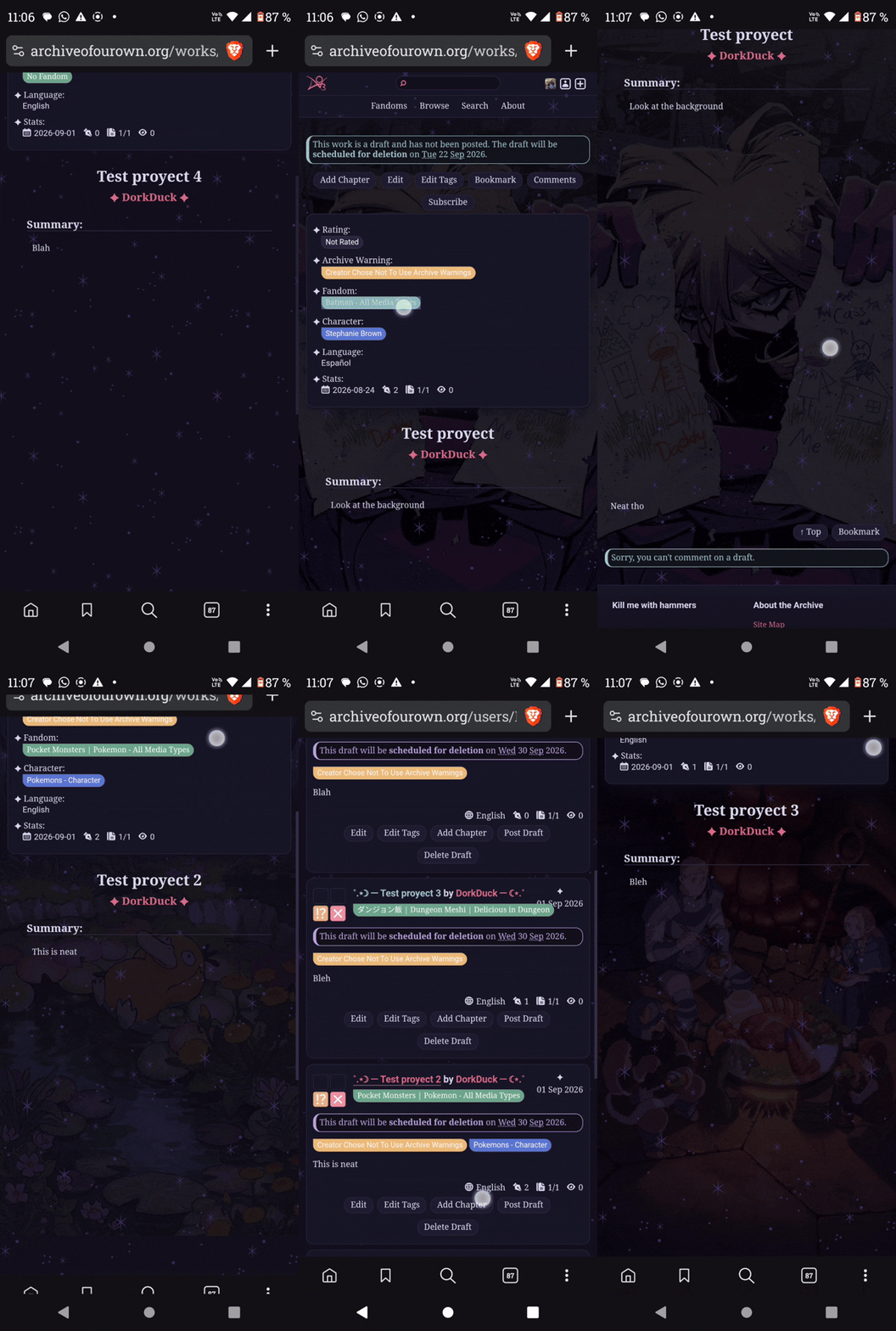
EXPLANATION
So, if you’re like me, you probably enjoy having multiple skins, but constantly switching between them can be very annoying. Plus, it can be kind of jarring when a skin doesn't match the vibe of what you're trying to read. Well, this tutorial is just for that. set up a single skin that automatically changes its background based on specific tags or authors.
I discovered this the other day when I realized you could apply the :has() selector to the #outer.wrapper element, and by putting #workskin inside the selector we can do a few things.
To get a visual reference, create a new skin and paste the following code into the css and see how it works.
#outer.wrapper {
background: red;
}
#outer.wrapper:has(#workskin) {
background: aqua;
}
*This will make the normal background red, and the background of works blue.
We can also chain more :has() selectors to get way more specific, so only works with both of our desired elements get affected, for example:
#outer.wrapper:has(#workskin):has(.byline.heading a[href*="/users/DorkDuck" i]) {
background: linear-gradient(to bottom, red, yellow);
}
*This will make my works and only my works have a gradient
but how does it work? a is any type of link, a[href*=" " i] searches for a specific string of words in a link, the .byline.heading is the element below the chapter title a.k.a the author, if you were to only put #outer.wrapper:has(#workskin):has(a[href*="/users/DorkDuck" i]) then if i commented in another work the layout would also get selected even though i only left a comment.
So now that you already know how to change the layout based on the author, how can you make sure that you affect something based on its tags?, well, it's quite easy!, as you know a is any link, if you replace it with .tag[href*=" " i], instead of any link, it will only search for tag’s links, which is really convienent that way if we wanna select the "Spiderman" tag we wont select the all the works from user Spidermanlover1234 regarless of their fandom. In the end it should look something like this.
#outer.wrapper:has(#workskin):has(.tag[href*="css" i]) {
background: linear-gradient(311deg,rgba(180, 58, 135, 1) 0%, rgba(253, 29, 29, 1) 50%, rgba(252, 176, 69, 1) 100%);
}
*And it should affect this work.
However, we can make this even MORE specific, we can do something similar to what we did with .byline.heading, a.k.a selecting a specific element. For example, if we wanted to select the background of all batman works, we could do something like this #outer.wrapper:has(#workskin):has(.tag[href*="batman" i]), and it would work most of the time, but if you click a work that in the additional tags put something like 'character x has a secret identity like batman' it would trigger the selections as well, even if it has nothing to do with it, sooo the solution to that problem is doing something like this.
#outer.wrapper:has(#workskin):has(.fandom.tags .tag[href*="batman" i]) {
background: HotPink;
}
as you can see, by putting .fandom.tags in front of the link, we can make sure that only fandom tags will be selected, here's a list with all the types of tags that you can search for, since i believe the names are self-explanatory i wont delve into that.
- .rating.tags
- .warning.tags
- .category.tags
- .fandom.tag
- .relationship.tags
- .character.tags
- .freeform.tags
So at last, how can you select an specific work?, believe it or not its quite easy too, look at the url of this work https://archiveofourown.org/works/92860036, copy the last part, and paste it like this
#outer.wrapper:has(#workskin):has(a[href*="/works/92860036" i]) {
background: Indigo;
}
That part that we copied was the work ID, and only that specific work has it.
btw we can chain and mix as many :has( ) as we want for example; #outer.wrapper:has(#workskin):has(.tag[href*="tag1" i]):has(.tag[href*="tag2" i])
Sooo how do i add this to my normal skin?, well you could just put it in your regular skin, but for organization purposes i recomment to add it as a parent skin,
Ps: This shouldn't happen but in the case there is a weird overlap between this skin and your regular skin my only suggestion is to add the !important moddifier.
#outer.wrapper:has(#workskin):has(...) {
background: black !important;
}
THE CODE:
*For selecting users:
#outer.wrapper:has(#workskin):has(.byline.heading a[href*="/users/USERNAME" i]) {
background: …;
}
*For selecting works:
#outer.wrapper:has(#workskin):has(a[href*="/works/WORK-ID" i]) {
background: …;
}
*For selecting tags:
#outer.wrapper:has(#workskin):has(.tag[href*="TAGNAME" i]) {
background: …;
}
So now that were done, i think i can show you what the heck i did in the preview, let it be know that i'm using the Rosé Pine — Closer to Home skin by ravenothere, so the code was made with that as a base and it won't look good on its own.
Here is the raw code
#outer.wrapper:has(#workskin):has(.fandom.tags .tag[href*="batman" i]) {
background: #191724;
background-image: url("https://images.squidge.org/images/2026/09/01/1000137579.png"), url("https://images.squidge.org/images/2026/08/31/imagen9cb313c36e151c98.png");
background-size: 400px,cover;
background-repeat: repeat, no-repeat;
background-attachment: scroll, fixed;
background-position: center,center bottom;
}
#outer.wrapper:has(#workskin):has(.fandom.tags .tag[href*="pokemon" i]) {
background: #191724;
background-image: url("https://images.squidge.org/images/2026/09/01/1000137579.png"), url("https://images.squidge.org/images/2026/08/31/imagenb0a62638fc0c72c5.png");
background-size: 400px,cover;
background-repeat: repeat, no-repeat;
background-attachment: scroll, fixed;
background-position: center,center bottom;
}
#outer.wrapper:has(#workskin):has(.fandom.tags .tag[href*="avatar" i]) {
background: #191724;
background-image: url("https://images.squidge.org/images/2026/09/01/1000137579.png"),url("https://images.squidge.org/images/2026/08/31/imagen557e3b5cb0049f50.png");
background-size: 400px,cover;
background-repeat: repeat, no-repeat;
background-attachment: scroll, fixed;
background-position: center,center bottom;
}
#outer.wrapper:has(#workskin):has(.fandom.tags .tag[href*="dungeon" i][href*="meshi" i],
.fandom.tags .tag[href*="Delicious" i][href*="Dungeon" i]) {
background: #191724;
background-image: url("https://images.squidge.org/images/2026/09/01/1000137579.png"), url("https://images.squidge.org/images/2026/08/31/imagen76399d29edc363d2.png");
background-size: 400px,cover;
background-repeat: repeat, no-repeat;
background-attachment: scroll, fixed;
background-position: center,center bottom;
}
I know this can look a bit more complex, but i will try to break it down, using the first part of the code as an example.
#outer.wrapper:has(#workskin):has(.fandom.tags .tag[href*="batman" i]) {
background: #191724;
background-image: url("https://images.squidge.org/images/2026/09/01/1000137579.png"), url("https://images.squidge.org/images/2026/08/31/imagen9cb313c36e151c98.png");
background-size: 400px,cover;
background-repeat: repeat, no-repeat;
background-attachment: scroll, fixed;
background-position: center,center bottom;
}
the selector is not different to the ones ive explained before, only works tagged with the fandom tag "batman" will have their layout affected,
background: #191724;
background-image: url("https://images.squidge.org/images/2026/09/01/1000137579.png"), url("https://images.squidge.org/images/2026/08/31/imagen9cb313c36e151c98.png");
look how i put two background properties, i did that since the background-image i want to display is hosted in another site, and depending on your interned speed it can sometimes take a second or two to load, and i dont want to get flashbangged in the middle of the night, so the first background is there to prevent that.
background-image:
url("https://images.squidge.org/images/2026/09/01/1000137579.png"), url("https://images.squidge.org/images/2026/08/31/imagen9cb313c36e151c98.png");background-size:
400px,cover;background-repeat:
repeat, no-repeat;background-attachment:
scroll, fixed;background-position:
center,center bottom;
Since this is a bit more complex, I color-coded it so its clear that we are our properties have two values, i do this because want to archive two different effects within the same selector, when we do this its important to remember to be careful with the number of values, if we put two values in background-image: and then put only one in background-size: then that would affect both image values, if we put two values in background-size: they would affect the image values in the same order that they were written, but if we put three values in background-size: the code would break.
the first image will overlap the other, its has a 400px size and repeats and scrolls with the page like a patern, the other image has a wallpaper effect, it resizes itself to cover the entired screen and its position its fixed.
and voilà its done! Of couse in this if I only toyed with the #outer.wrapper element, but you can do way more with this!, for example if you put an image that makes fics hard to read, you could do something like this
#outer.wrapper:has(#workskin):has(.tag[href*="fandom" i]) {
background: linear-gradient(darkorange, deeppink);
}
#outer.wrapper:has(.tag[href*="fandom" i]) #workskin {
background: linear-gradient(deeppink,darkorange);
color: LightSeaGreen;
}
now go and have fun with this!