
Post Header
In our ongoing efforts to give you more tools for curating your Archive experience, we're rolling out a new interface to let you hide content by specific users.
Blocking and Muting: A Refresher
We'll be implementing two sets of features to help users curate their own experiences and add a layer of protection against harassment, without making it harder for people to create and interact with content on the Archive:
- Blocking, which will prevent certain users from interacting with you.
- Muting, which will exclude content by certain users from your personal Archive experience.
Because applying these concepts to all of the Archive's numerous and often interconnected features at once would be a massive undertaking, we're taking a gradual approach that will allow you to block and mute users in some areas while we continue to work on others.
You already have the ability to block specific users from commenting on your works or replying to your comments; now you will also be able to hide users' works, bookmarks, and comments from view.
What does muting do?
While we plan to extend the functionality in future updates, for now you'll be hiding the following items if you mute a user:
- works they've created (or co-created) in search results and tag listings (you can still access the works themselves, if you have a direct link)
- bookmarks they've created
- other users' bookmarks of their works or series
- comments they've left
We're accomplishing this by automatically generating a bit of CSS that removes the relevant content from view and hides it from assistive tech, such as screen readers. While you were already able to do this with a custom site skin, this new feature only asks for a username and does the rest.
Since this is still done with skins, please note that numbers at the top of search results or in the tag filters (which are provided by our search engine) might be different from the number of works or bookmarks that are presented to you. We also don't replace content by muted users with empty space, placeholder text, or any other indication that something was hidden.
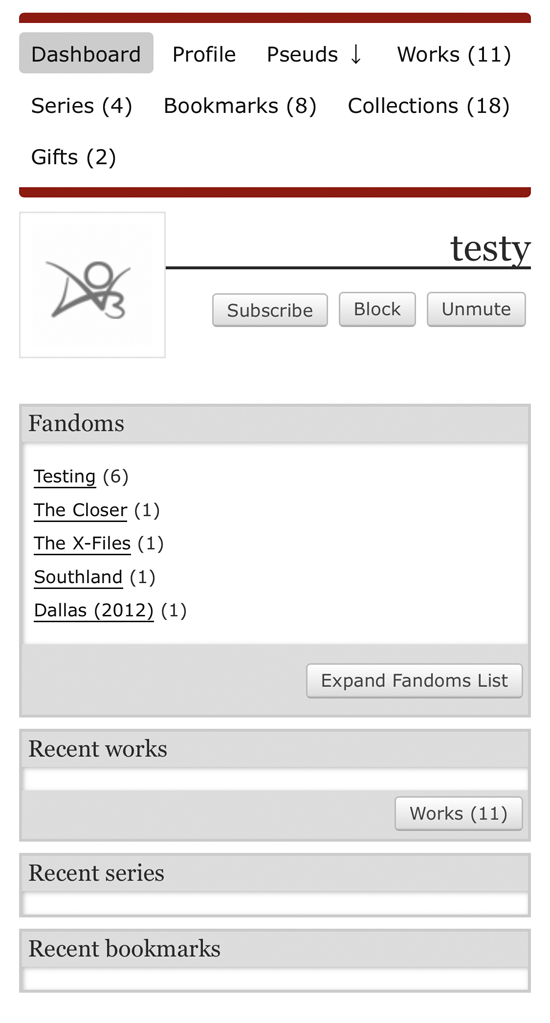
How do I mute users?
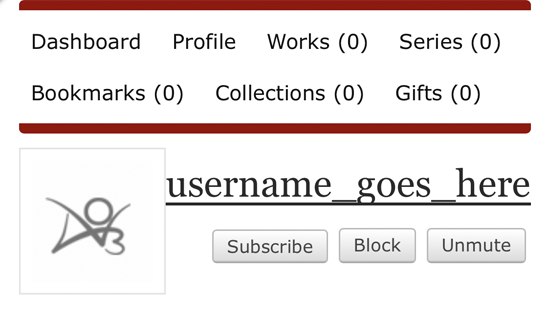
A "Mute" button will be added to user and pseud dashboards as well as user profiles. It will turn into an "Unmute" button when activated, so you can easily reverse your choice.
We're also providing an interface to manage your muted users. It allows you to add new users to your list, and unmute users. A muted user will remain muted even if they change their name.
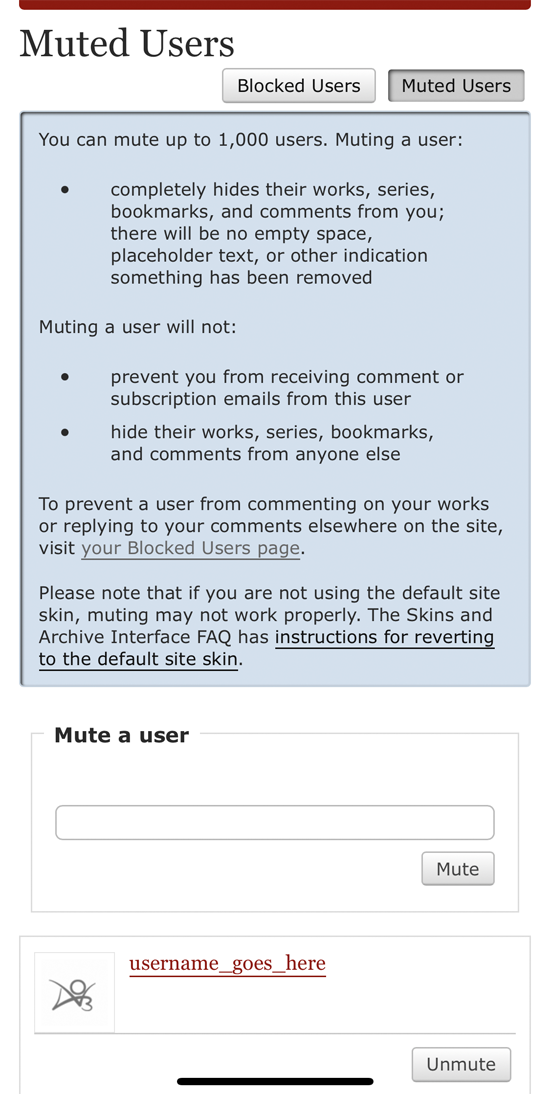
From this page, you can also easily access your list of blocked users, to manage those separately.
Other options
In addition to our blocking and muting features, there are a variety of existing ways to control your Archive experience, including built-in preferences and third-party tools. You can also use a site skin to mute specific works, bookmarks, or series.
Pages Navigation
InsertNameOriginalHere Thu 09 Feb 2023 08:04PM UTC
Comment Actions
unaesthetically Thu 09 Feb 2023 11:43PM UTC
Comment Actions
theblueststatic Fri 10 Feb 2023 12:41AM UTC
Comment Actions
checkerspot Fri 10 Feb 2023 01:26AM UTC
Comment Actions
sarken (AO3_ADT) (Official) Sat 11 Feb 2023 04:52AM UTC
Comment Actions
CryDeku Fri 10 Feb 2023 02:14AM UTC
Comment Actions
grommile Fri 10 Feb 2023 03:24PM UTC
Comment Actions
sarken (AO3_ADT) (Official) Sat 11 Feb 2023 04:53AM UTC
Comment Actions
NothingButMammals Fri 10 Feb 2023 05:29AM UTC
Comment Actions
honilee Fri 10 Feb 2023 01:27PM UTC
Comment Actions
peachos Fri 10 Feb 2023 04:31PM UTC
Comment Actions
onezoidtwohearts Fri 10 Feb 2023 07:27PM UTC
Comment Actions
Kagaminecest_02 Sat 11 Feb 2023 09:19AM UTC
Comment Actions
Nightcandle Sat 11 Feb 2023 12:58PM UTC
Comment Actions
gyroslefttit Sat 11 Feb 2023 05:52PM UTC
Comment Actions
SlightWeasel Sat 11 Feb 2023 08:05PM UTC
Comment Actions
kroboniI Sun 12 Feb 2023 11:37AM UTC
Comment Actions
MMagg Sun 12 Feb 2023 01:15PM UTC
Last Edited Sun 12 Feb 2023 01:24PM UTC
Comment Actions
Acid_AcidBunny Sun 12 Feb 2023 05:30PM UTC
Comment Actions
Pages Navigation