AO3 News

Post Header

AO3 Update

We're excited to announce that we're exiting open beta! We've come a long way from when we announced and launched AO3 open beta in 2009.

At launch, there were just 347 AO3 accounts and 6,598 works. While we started growing very quickly, we were originally much more limited in what we could do.

Did you know that AO3 invitations were originally sent out manually by individual AO3 volunteers? During our initial rapid growth, we were still only sending out about 1200 invitations per day, and eventually tapered off to 50 per day. Today, we send around 6,000 invitations every 12 hours. Our old news posts also include fun stats about what AO3's user base and works looked like in 2009, which you can compare to the stats post we recently shared in January to see how far we've come.

What's Changed Since Then

Since 2009, AO3 has grown and changed a lot. We've introduced many features over the years through the efforts of our volunteers and coding contributors, as well as the contractors we've been able to hire thanks to generous donations from our users. While there are a lot of additions we're proud of, some of our favorites include:

Looking at where we are now in 2026, we recently celebrated 10 million registered users and 17 million fanworks! We're grateful for all the fans that have accompanied us all this time—all of our accomplishments are thanks to you!

Some recent improvements we've made include adding new options to bookmark and collections filtering and updating all of the buttons at the bottom of the forms for posting, previewing, or editing a work to make them more user-friendly.

What's Next for AO3 and How You Can Help

As the AO3 software has been stable for a long time, the change is mostly cosmetic and does not indicate that everything is finalized or perfectly working. Exiting beta doesn't mean we'll stop continuing to improve AO3—our volunteer coders and community contributors will still be working to add to and improve AO3 every day. For one, it’s likely you’ll continue to see references to us being in beta for a while as we update our documentation.

If you'd like to see what issues are being worked on, check out our project on Jira. This is a public list of all the bugs and features that are on the to-do list for our coders.

If you're familiar with coding and would like to contribute your time, we welcome contributions from anyone! Take a look at our Contributing Guidelines and other documentation on GitHub. All contributors are credited in our release notes.

If you're interested in helping AO3 but don't have any coding ability, consider volunteering for one of the other teams that work on AO3 or contributing to AO3 in some other way.

If you have a feature request or bug to report, please contact AO3 Support. Support handles communication between users and the various teams involved with AO3. The Support team helps to resolve technical problems experienced by users and passes on users' feedback to the relevant committees.

Circular badge with the words 'I was here for beta' with an AO3 logo

For all the fans who were part of our beta journey from 2009 until today, here's a badge for you, as a small thank you for your support! You're welcome to display this badge on social media, your AO3 profile, or any other website of your choosing. For example, if you want to display the badge in your AO3 profile, add this HTML tag: <img src="https://media.archiveofourown.org/news/ao3-updates/2026-04-leaving-beta/badge-english.png" alt="Circular badge with the words 'I was here for beta' with an AO3 logo"> into the "About Me" section in your profile. If you’d like more information on how to embed images, refer to our Posting and Editing FAQ or our guide on how to format HTML on AO3!

We are deeply appreciative and grateful for all the support we've gotten from fans since we were founded, so let us be the first to say: Welcome to Post-Beta AO3!


The Organization for Transformative Works is the non-profit parent organization of multiple projects including Archive of Our Own, Fanlore, Open Doors, OTW Legal Advocacy, and Transformative Works and Cultures. We are a fan-run, donor-supported organization staffed by volunteers. Find out more about us on our website.


Comment

Post Header

We've just given the code for collection browsing and filtering a much-needed overhaul! In addition to some long overdue performance improvements, this update introduces collection tags — a new way to find collections featuring the fandoms, relationships, tropes, and other topics you enjoy.

How do collection tags work?

Collection owners can now use up to 10 tags of any type (What are the different types of tags?) to describe their collection. The tags are listed on the collection blurb, and the collection filters have a new "Filter by tag" autocomplete field to help users find collections matching their interests.

A collection blurb next to the collection filters. The blurb has tags listed under the collection title and the filters have a 'Filter by tag' field beneath 'Filter by title.'

While it is possible to use brand new tags on collections, we strongly encourage owners to use existing canonical tags or their synonyms. This makes it easier for users to find your collection using the autocomplete options in the collection filters.

We've also added a "Multifandom" option specifically for collections that feature a wide variety of fandoms. Collection owners can select this option to help users find collections where the focus isn't a specific fandom, but rather a theme like fanvids of old films or fic written in first person. We think this will be particularly useful for users whose fandoms don't have their own prompt memes or gift exchanges, but who want to find challenges they might be able to participate in.

Please note that while we encourage collection owners to start using the "Multifandom" option right away, there are a few more changes we need to make before it will be possible to filter collections based on their multifandom status. We'll update this post when multifandom filtering becomes available.

What about existing collections?

Together with the collection tags feature going live, we automatically tagged existing collections with the fandoms from their works and bookmarks, as well as any works or bookmarks in their subcollections.

Additionally, collections with more than one unrelated fandom were automatically marked as multifandom. We used our tag wrangling system to determine whether fandoms are related, just like we do when marking works as crossovers. Collections with more than 10 fandoms (the limit for collection tags) were marked as multifandom but did not have any fandom tags added.

Collection owners are welcome to edit their collection and change any information we automatically added.

Other changes

As part of the browsing and filtering overhaul, there are a few other noticeable changes to collections.

  • Subcollections are now listed on the main Collections page and included in the results when filtering.
  • In order to make room for collection tags, we've combined the list of owners and moderators in blurbs, similar to the way they're combined on the collection profile. Because we know this distinction may be important to some users, we've made it possible to style owners and moderators separately by using the a.owner and a.mod selectors in a site skin. (Your styles will apply in the blurb and on the collection profile.)
  • The Open Challenges page, including the Open Gift Exchanges and Open Prompt Memes pages, now list collections that are closing the soonest at the top of the page.

Update 12:14 UTC 28 September 2025: The multifandom filtering options have now been added to the filters!

Comment

Post Header

Over the past several months, the Archive of Our Own has been experiencing an increase in spam comments left by registered users. To help prevent these comments, which typically ask for contact information and offer art commissions or collaboration, we'll be introducing limits on commenting and other activities for logged-in users. We expect to have these limits in place within the next few days.

As a result of these limits, you may get error messages telling you to "Retry later," especially when leaving or editing multiple comments over a short period of time. Our aim is to slow down the spammers with minimal impact on legitimate commenters, so we'll be monitoring the situation and adjusting the rate limits as needed once the code is in place. (This also means we can't tell you exactly what the limits are. However, we recommend waiting at least 15 minutes before trying again.)

Once these limits are in place, we'll also be looking into other methods that we hope will reduce spam with even less disruption to legitimate users. We apologize for the inconvenience and appreciate your understanding as we work to find a balance that meets everyone's needs.

Update 21:45 UTC 24 March 2025: Rate limiting for logged-in comments is now in place.

Comment

Post Header

Bullhorn and the words 'OTW Announcement'

With approximately 7 million registered users on AO3 and thousands of OTW members, news posts get more engagement than ever. We love when users express their thoughts or concerns regarding the news we publish! However, the comment sections on some of our previous news posts have not been a welcoming or safe space for engagement.

In recent months, we have developed a News Post Moderation policy and recruited a team of volunteers who you may see commenting on posts in the future. We would like to announce the key points of the policies our News Post Moderators will be following when monitoring the comment sections of our News Posts.

Comments on news posts may be frozen or hidden by a News Post Moderator if they contain:

  • Spam or unsolicited advertising
  • Content about topics outside of fans, fandom, and Internet policy, and which would not fall under the purview of the OTW
  • Misinformation (particularly about the OTW) with the potential to harm or mislead others
  • Explicit/graphic sexual or violent language
  • Attempts to draw negative attention to a specific individual or fanwork
  • Insults and personal attacks towards other users
  • Inflammatory or speculative language that may result in harassment
  • Violations of the site's Terms of Service

Please note that the above is not an exhaustive list of all comments that may be actioned.

In addition, any comments on AO3 News Posts that violate the Terms of Service may be reported to the Policy & Abuse committee.

OTW volunteers will respond to comments using an Official OTW committee account to clarify points of confusion or engage with user feedback. Comments from Official accounts will be clearly marked on AO3 with a bolded (Official) after the username, and on the OTW website with a signature identifying the relevant OTW committee or team. For example, comments from News Post Moderators will use the "OTW_News_Post_Moderation (Official)" account on AO3. On the OTW website, they'll be signed with their name followed by "OTW News Post Moderator".

If an OTW volunteer comments on a news post using a personal account, that volunteer is not acting in an official capacity. Such comments do not necessarily reflect the views of the OTW, nor do they constitute OTW policy.

We hope that our users will welcome this policy announcement and find that it improves their experience on the AO3 and OTW websites.


UPDATE: Due to a high number of off topic comments, comment moderation has been turned on. All comments now must be approved by a moderator before becoming visible. If you have any questions about this policy, please contact the News Post Moderation team directly using our contact form on the OTW website.

The Organization for Transformative Works is the non-profit parent organization of multiple projects including Archive of Our Own, Fanlore, Open Doors, Transformative Works and Cultures, and OTW Legal Advocacy. We are a fan-run, entirely donor-supported organization staffed by volunteers. Find out more about us on our website.
Comment

Post Header

Due to an influx of abusive spam comments on April 21, 2024, we temporarily disabled all guest comments across the site. We have now re-enabled the ability to leave guest comments, but if you comment while not logged into an account, you may encounter a verification page that checks that you are not a bot. We are also working on other ways to help reduce spam, including a small change to the default comment settings on the work posting form that will be rolled out soon.

What to do about spam you've received

If you've received a small number of spam comments, you can mark the comments as spam, using the "Spam" button at the bottom right of the comment. This helps to train our spam blocker to recognize the comments as spam.

If you've received hundreds of spam comments at a time -- so many you can't remove them all by yourself -- you can contact our Policy & Abuse team so that they can help with removing them in bulk. Please include your username and/or links to any affected works.

For more information on spam comments, please refer to "What is a spam comment? What can I do about spam?" in our FAQ.

How to prevent spam on your works

The vast majority of spam comments are left by guests, so you can help prevent spam by disabling guest comments on your already-posted works.

  • To do this for an individual work, go to the Edit Work page. In the Privacy section, select the option "Only registered users can comment". Then select the "Post Without Preview" button, or select the "Preview" button and then the "Update" button to save your changes.
  • You can also quickly edit the comment settings on multiple works at once rather than having to edit each one individually.

    On your Works page, select the button labeled "Edit Works" found towards the top right of the page on desktop (or below the # of Works heading on mobile). This will take you to the Edit Multiple Works page. All of your works are listed here, grouped according to fandom. Check the box next to each work that you wish to edit. If you intend to edit all your posted works, you can select the "All" button, which is located below the "Edit Works" button. If you'd like to clear your selections, select the "None" button in the same location. Once you have made your selections, select the "Edit" button towards the top or bottom of the page.

    In the Privacy section, select the option "Only registered users can comment". Then select "Update All Works" to apply the change to all of your selected works at once.

    For more information on editing multiple works, please refer to "How do I edit or delete multiple works at the same time?" in our FAQ.

Upcoming changes to fight spam

In the coming days, we will be rolling out a change to the work posting form, which will affect who can comment on new works by default. You can easily change this setting before or after posting.

We currently offer various privacy settings for your works, including options to enable comment moderation or restrict your work to logged-in users. You can also choose who can comment on your work:

  • Registered users and guests can comment
  • Only registered users can comment
  • No one can comment

Right now, "Registered users and guests can comment" is selected by default.

Once we have deployed this code change, "Only registered users can comment" will be the default selection. If you don't change anything in the privacy settings, guests (including spammers and bots) won't be able to leave a comment on your work. You can select a different option before or after posting if you wish to allow comments from both guests and registered users, or if you don't want to allow any comments at all.

The comment settings on existing works and drafts will not be affected by this change.

We're hoping this change will be one way of helping to combat spam comments and anonymous harassment, and we will continue to work on features that let you tailor the Archive to your needs.

Comment

Post Header

In our ongoing efforts to give you more tools for curating your Archive experience, we're rolling out a new interface to let you hide content by specific users.

Blocking and Muting: A Refresher

We'll be implementing two sets of features to help users curate their own experiences and add a layer of protection against harassment, without making it harder for people to create and interact with content on the Archive:

  • Blocking, which will prevent certain users from interacting with you.
  • Muting, which will exclude content by certain users from your personal Archive experience.

Because applying these concepts to all of the Archive's numerous and often interconnected features at once would be a massive undertaking, we're taking a gradual approach that will allow you to block and mute users in some areas while we continue to work on others.
You already have the ability to block specific users from commenting on your works or replying to your comments; now you will also be able to hide users' works, bookmarks, and comments from view.

What does muting do?

While we plan to extend the functionality in future updates, for now you'll be hiding the following items if you mute a user:

  • works they've created (or co-created) in search results and tag listings (you can still access the works themselves, if you have a direct link)
  • bookmarks they've created
  • other users' bookmarks of their works or series
  • comments they've left

We're accomplishing this by automatically generating a bit of CSS that removes the relevant content from view and hides it from assistive tech, such as screen readers. While you were already able to do this with a custom site skin, this new feature only asks for a username and does the rest.
Since this is still done with skins, please note that numbers at the top of search results or in the tag filters (which are provided by our search engine) might be different from the number of works or bookmarks that are presented to you. We also don't replace content by muted users with empty space, placeholder text, or any other indication that something was hidden.

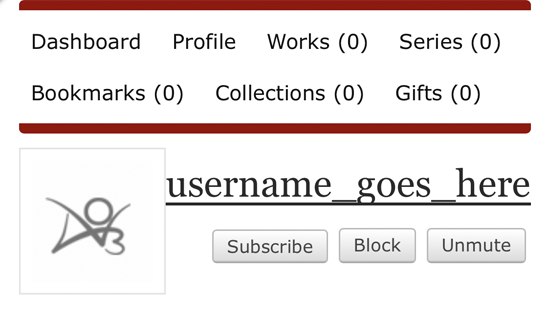
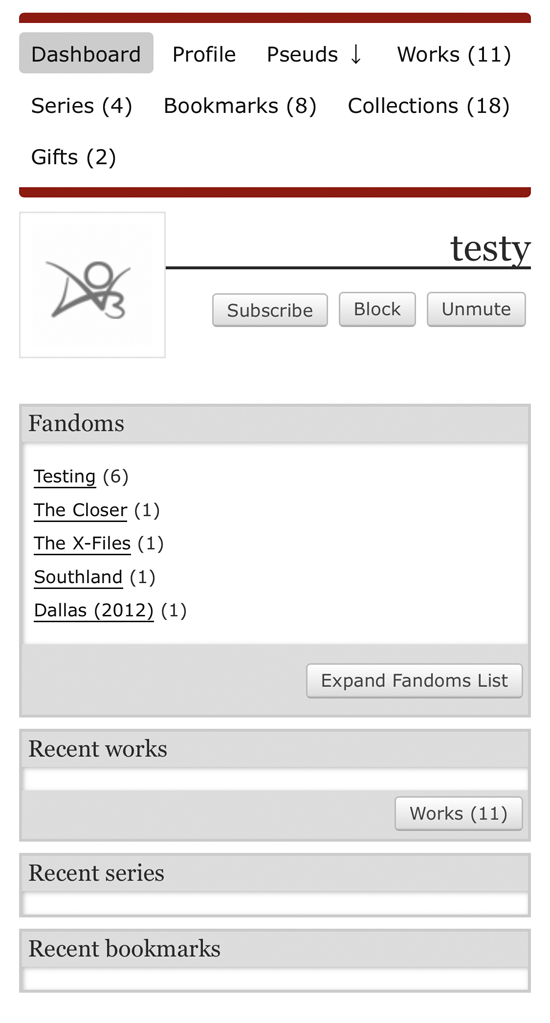
The dashboard of a user you have muted will show no content under the Recent works, Recent series, and Recent bookmarks headings.

How do I mute users?

A "Mute" button will be added to user and pseud dashboards as well as user profiles. It will turn into an "Unmute" button when activated, so you can easily reverse your choice.

The Mute button will join the Subscribe and Block buttons underneath the username on a dashboard page.

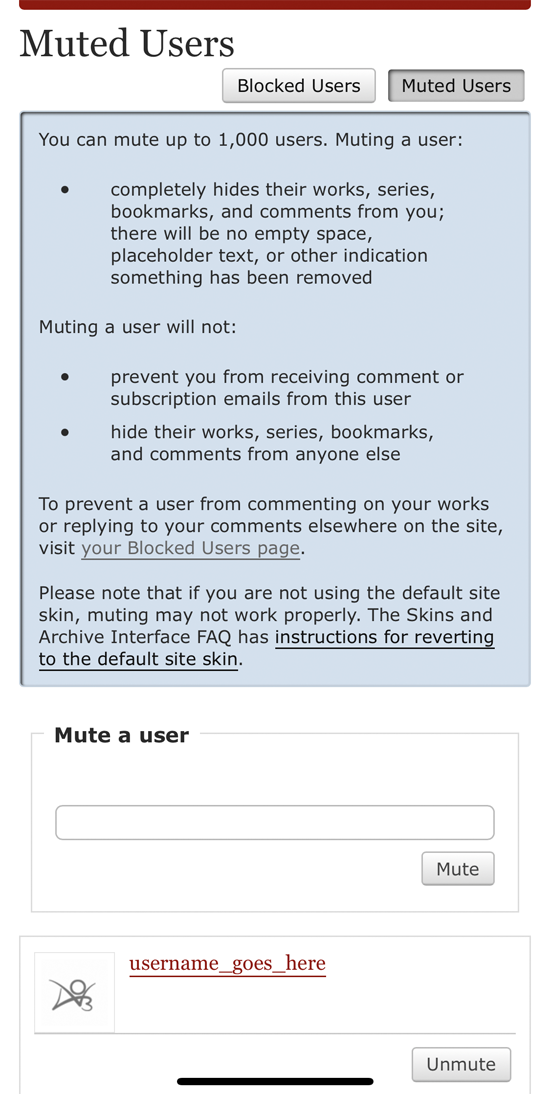
We're also providing an interface to manage your muted users. It allows you to add new users to your list, and unmute users. A muted user will remain muted even if they change their name.

The Muted Users page describes what muting does and allows you to mute additional users via a small form. It also lists users you have muted and provides an option to unmute them.

From this page, you can also easily access your list of blocked users, to manage those separately.

Other options

In addition to our blocking and muting features, there are a variety of existing ways to control your Archive experience, including built-in preferences and third-party tools. You can also use a site skin to mute specific works, bookmarks, or series.

Comment

Post Header

We're pleased to announce that, in the coming days, we'll be rolling out the first part of our blocking and muting features: the ability to block specific logged-in users from commenting on your works and replying to your comments.

Blocking and Muting: A Refresher

We'll be implementing two sets of features to help users curate their own experiences and add a layer of protection against harassment, without making it harder for people to create and interact with content on the Archive:

  • Blocking, which will prevent certain users from interacting with you.
  • Muting, which will exclude content by certain users from your personal Archive experience.

Because applying these concepts to all of the Archive's numerous and often interconnected features at once would be a massive undertaking, we're taking a gradual approach that will allow you to block and mute users in some areas while we continue to work on others.

Blocking Part 1: Comments

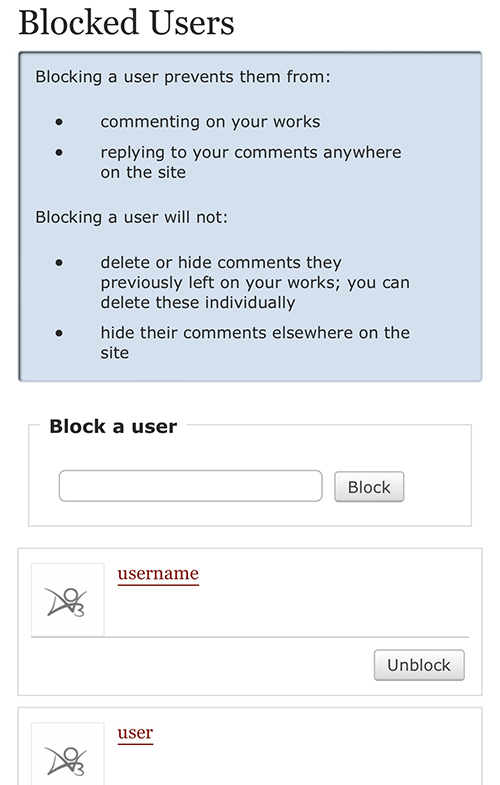
The Blocked Users page describes what blocking does and allows you to block additional users via a small form. It also lists users you have blocked and provides an option to unblock them.

With this first release, we're focusing on blocking comments from logged-in users. When you block a user, they will no longer be able to comment on your works or reply to comments you've left on news posts or other creators' works. They will also be unable to edit existing comments or replies they've left you.

The block will persist even if the blocked user changes their name.

You can block a user by pressing the "Block" button on their profile, dashboard, or comments. Users you've previously blocked can be unblocked from these locations as well.

You can also block a user by entering their name on the new Blocked Users page, accessible by following the "Blocked Users" link on your preferences page.

The Blocked Users page lists all of the users you've blocked. Other users will not be able to see who you've blocked -- the only people with access to your list of blocked users will be you and site admins with certain access levels.

If you suspect someone you've blocked is still commenting on your works or replying to your comments elsewhere on the Archive, contact the Policy & Abuse team.

Please note that if you block a user with whom you've co-created works, your blocked co-creator will still be able to comment on works you've co-created. However, they will not be able to reply directly to your comments on those works.

Muting: An Update

We're working on a similar interface for muting logged-in users, but in the meantime, you can mute users, works, series, or external works by creating a site skin and using the following CSS:

  • .user-000 { display: none !important; } to hide all of a user's works, series, and bookmarks from work and bookmark listings and search results, as well as any logged-in comments the user has left on works or news posts. Replace 000 with the ID of the user whose works you want to hide. A user's ID is a series of numbers that can be found on the user's profile in the "My user ID is" section. A user's ID does not change if the user changes their name.
  • .work-000 { display: none !important; } to hide a specific work from work and bookmark listings and search results. Replace 000 with the ID of the work you want to hide. The work ID is a series of numbers that can be found in the work URL. The ID comes immediately after /works/, e.g. https://archiveofourown.org/works/000/chapters/123.
  • .series-000 { display: none !important; } to hide a specific series from bookmark listings and search results, as well as users' series pages. Replace 000 with the ID of the series you want to hide. The series ID is a series of numbers that can be found in the series URL. The ID comes immediately after /series/, e.g. https://archiveofourown.org/series/000.
  • .external-work-000 { display: none !important; } to hide a specific external work from bookmark listings and search results. Replace 000 with the ID of the external work you want to hide. (Note that there may be multiple copies of a given external work, each with a different ID.) The external work ID is a series of numbers that can be found in the external work URL. The ID comes immediately after /external_work/, e.g. https://archiveofourown.org/external_work/000.

To hide multiple items, you can separate the selectors with a comma: .work-000, .work-149319, .user-000000 { display: none !important; }

Other Options

In addition to the upcoming blocking and muting features, there are a variety of existing ways to control your Archive experience.

Our Unofficial Browser Tools FAQ lists some third-party scripts that let you filter out unwanted content, and here are some built-in options for managing various features:

We're always working on more options like this, so be sure to check back regularly -- we announce most major changes here at AO3 News shortly before they're released. You can also follow @AO3_Status on Twitter or ao3org on Tumblr to stay up to date.

Update 20:59 UTC 10 June 2022: These changes have now been deployed.

Comment

Post Header

In the next few days, we'll be rolling out a new preference to give users more control over who can give them gift works. This change is an important step in our ongoing work to give users more options to control their experience on the Archive and limit unwanted interactions.

The preference will be called "Allow others to give me gift works outside gift exchanges and prompt memes."

When this preference is enabled, any AO3 user will be able to give you a work. That's the current behavior on the Archive, and it will be the default behavior for all existing users.

When the preference is disabled, the only users who will be able to give you works are users who have either been assigned to create a fanwork for you in a gift exchange or claimed one of your non-anonymous prompts in a prompt meme. In other words, if you absolutely do not want to receive gifts from anyone, you can disable this preference and avoid signing up for challenges.

The preference will be disabled by default for accounts created after the roll out. (We'd usually disable any new preferences by default, but allowing gifts is necessary to avoid interfering with ongoing challenges.)

If a user has the preference disabled and you attempt to give them an unrequested gift, you will receive an error message telling you the user does not allow gifts.

The preference only applies to new gifts, so you will still be able to edit any existing gifts without removing the recipient.

Your Gifts page will remain accessible regardless of whether you've enabled or disabled the preference. You will still be able to refuse existing or new gifts.

Wait, what?

  • If you're an existing AO3 user, nothing will change unless you update your preferences.
  • If you never want to receive gift works, you can uncheck "Allow others to give me gift works outside gift exchanges and prompt memes" on your preferences page and avoid signing up for any challenges.

We'll update this post to let you know when the changes have been deployed.

Update 10:10 UTC 6 February 2022: These changes have now been deployed.

Comment


Pages Navigation